




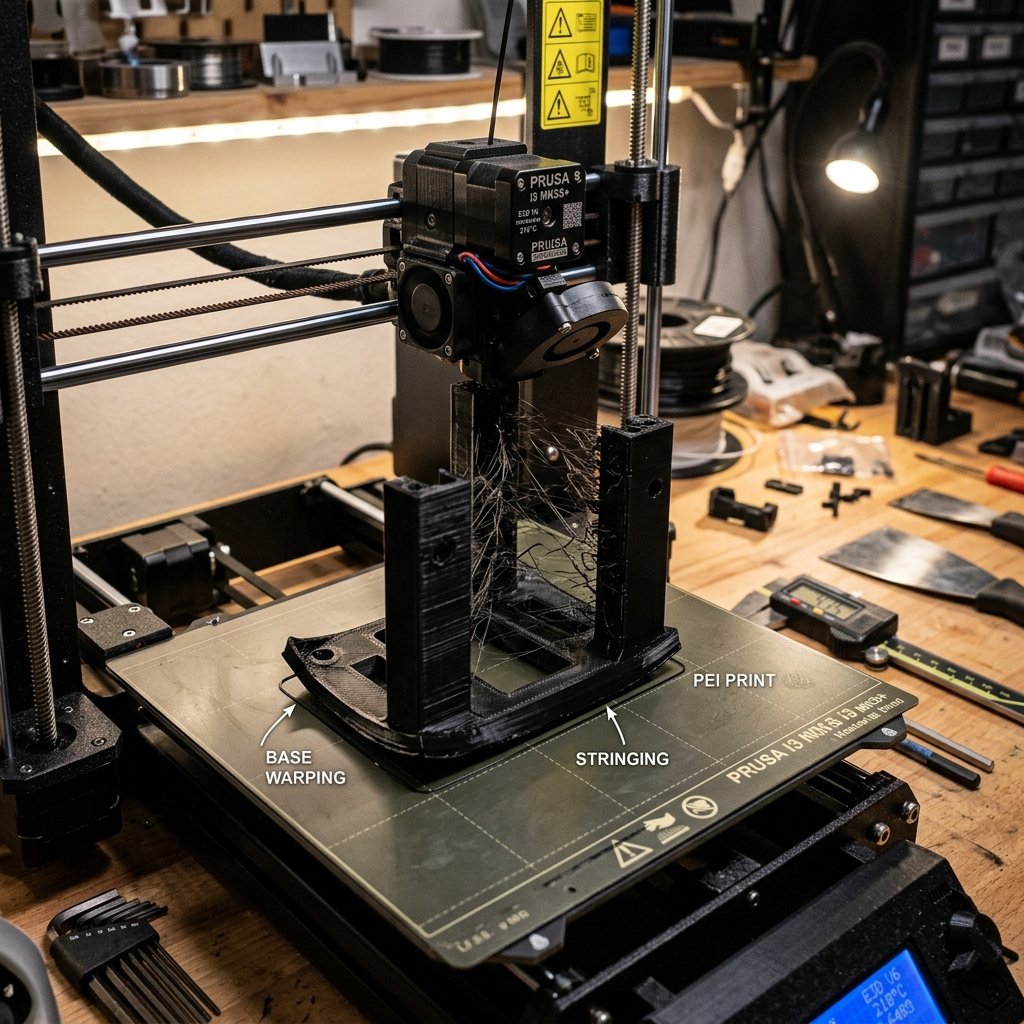
3D printing is a fantastic blend of digital modeling and physical engineering, but it is rarely a push-button process. Sooner or later, every maker will face print failures. The nozzle might extrude a messy bird's nest of spaghetti, parts might peel off the bed mid-print, or layers might shift. In this guide, we analyze the four most common printing errors and outline how to fix them.
1. Corner Warping (Poor Bed Adhesion)
Warping occurs when the corners of your print bend upwards and peel away from the build plate. This happens because hot plastic shrinks as it cools. If the bottom layers cool down too quickly, they pull inwards, breaking the bond with the build plate.
- How to Fix It:
- Level the bed: Ensure your first layer nozzle-to-bed clearance is perfect (the first layer must have a slight, uniform squish).
- Clean the bed: Clean the surface with 99% Isopropyl Alcohol (IPA) to remove finger oils that ruin adhesion.
- Use adhesive helper: Apply a thin coat of glue stick or specialized bed adhesive if printing on glass or bare metal.
- Add a Brim: In your slicer, enable a "Brim" (extra outer concentric lines) to expand the surface area holding the model down.
- Prevent drafts: Turn off room fans and keep windows closed, or use a cardboard box/tent enclosure to trap hot air around the printer.
2. Stringing and Oozing (Spaghetti-like Fine Hair)
Stringing is characterized by thin, spiderweb-like strands of plastic running between parts of your print. It happens when molten plastic oozes from the nozzle while it is traveling through open air from one point to another.
- How to Fix It:
- Tune Retraction: Adjust retraction settings in your slicer. Increase retraction distance (try 1mm - 2mm for direct drive, 4mm - 6mm for Bowden extruders) and retraction speed (35mm/s - 45mm/s).
- Lower Temperature: If the plastic is too hot, it becomes runny like water. Lower the print temperature by 5°C or 10°C.
- Dry Your Filament: Wet filament vaporizes moisture in the hotend, pushing plastic out of the nozzle even during retractions. Dry the spool.
⚠️ Mechanical Maintenance is Key
Many printing failures that look like slicer issues are actually mechanical. Check your belt tensions regularly—belts should feel taut like guitar strings. A loose belt is the primary cause of oval-shaped holes and mysterious layer shifts.
3. Layer Shifting (Misalignment)
Layer shifting happens when the printer's extruder head suddenly loses track of its position, causing subsequent layers to print offset from the bottom section. This ruins the entire print and wastes filament.
- How to Fix It:
- Check Belt Tension: Loose belts slip over the stepper motor pulleys. Tighten them so they don't jump teeth.
- Check Pulley Screws: Tighten the tiny grub screws holding the drive pulleys to the motor shafts.
- Reduce Printing Speed: Extremely high print speeds or acceleration can cause the motors to skip steps under inertia. Lower your speed settings.
- Avoid Physical Obstacles: Ensure wires don't catch on the frame, and enable **Z-hop** in your slicer so the nozzle lifts up slightly when traveling over printed areas.
4. Clogged Nozzles (Under-extrusion)
Under-extrusion happens when the printer is unable to push out enough plastic. You will see missing layers, thin fragile walls, or gaps. In worst cases, the print stops extruding entirely while the machine keeps moving.
- How to Fix It:
- The Cold Pull: Heat the nozzle to 220°C, feed a piece of nylon or PLA, turn off the heater, let it cool to 90°C, and then pull the filament out quickly. This yanks out dirt and burnt plastic inside the nozzle.
- Nozzle Needle: Use a tiny 0.4mm acupuncture needle inserted into the heated nozzle tip to break up blockages.
- Extruder Arm Check: Make sure the spring arm on your extruder isn't cracked (common on stock plastic Ender 3 extruders) and that the tension gear isn't slipping.
- Avoid Heat Creep: Ensure the hotend cooling fan is running at 100%. If it fails, heat travels up the metal throat, melting plastic prematurely and causing a solid clog.
Summary
Troubleshooting is part of the 3D printing journey. By systematic elimination—first cleaning and leveling, then checking mechanical belt tightness, and finally tuning retraction and heat settings—you can resolve almost any issue yourself.
Don't have the time to debug printer settings, or need high-tolerance functional parts printed on fine-tuned machines? Reach out to us at 3D Print Book via our Contact Page and we'll take care of it for you!