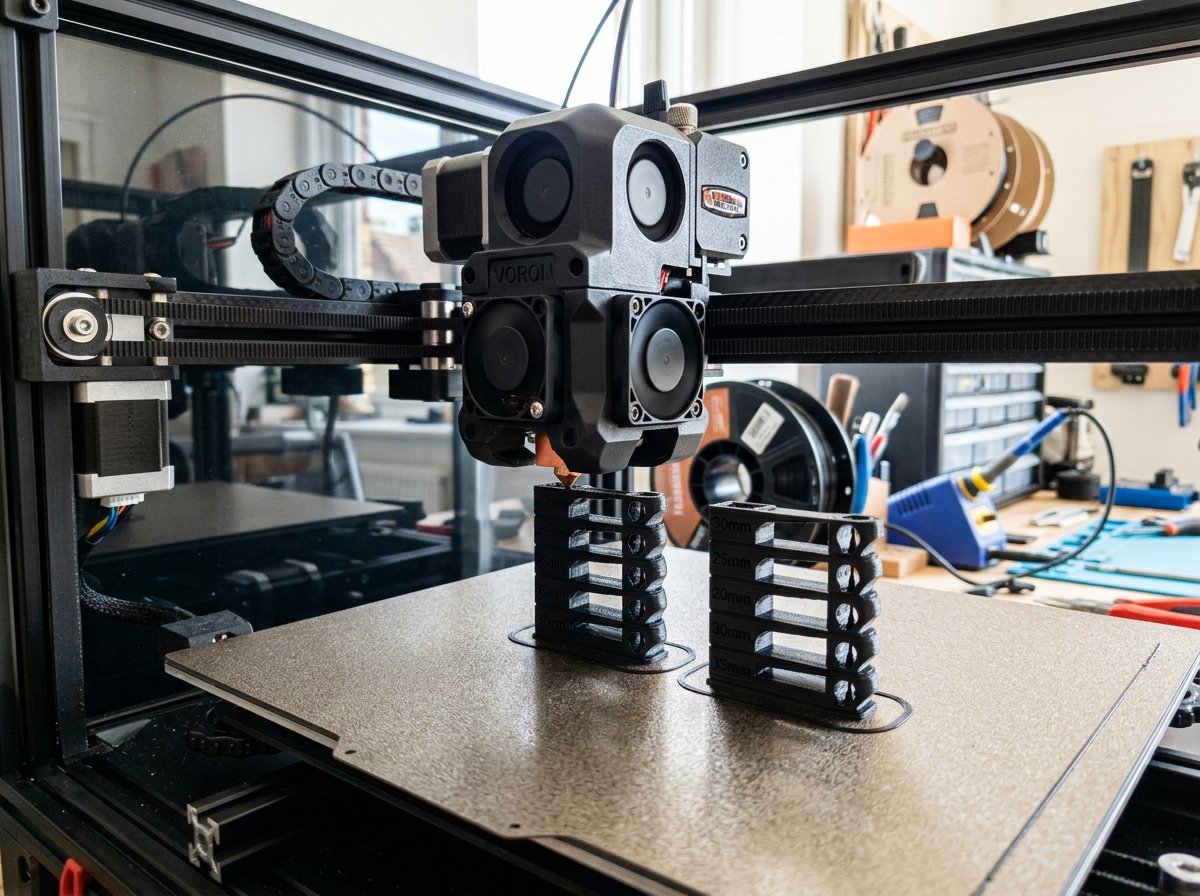
With the rapid transition to high-speed CoreXY 3D printers like the Bambu Lab P1S, Voron 2.4, Creality K1, and Elegoo Centauri Carbon, stringing and wispy cobwebs have become more frequent. When makers ask how to improve 3d print quality, eliminating fine hair-like strands across open travel gaps is usually one of the most visible upgrades to part appearance.
On legacy bed-slingers printing at 45 mm/s, stringing was almost always solved by increasing retraction distance. On modern high-speed toolheads equipped with high-flow melt zones, however, blindly increasing retraction distance from 0.8 mm up to 2.0 mm often causes heat-creep clogs rather than clean travel paths. The combination of elevated melt temperatures, high chamber heat, and fluid plastic requires a structured tuning process.
In this guide, I will share the exact step-by-step troubleshooting workflow I use across my FDM print farm to diagnose oozing versus stringing, calibrate direct drive and Bowden retractions, and match travel speeds with nozzle temperatures for spotless prints.
The Root Causes of FDM Stringing and Oozing
FDM stringing is the unintended formation of thin plastic threads between separate printed sections during non-extrusion travel movements. It occurs when residual molten plastic leaks from the nozzle tip as the toolhead moves across open air.
Understanding the distinction between true stringing and heavy oozing is essential before changing slicer settings. On help forums like r/FixMyPrint, users frequently confuse thermal oozing with retraction failure, leading to incorrect slicer changes.
- Wispy Stringing (Cobwebbing): Very thin, hair-like fibers that form when a microscopic dot of plastic stretches out as the toolhead travels rapidly between towers.
- Heavy Oozing and Blobs: Thick plastic drips or branching spurs that leak from the nozzle tip during slow travel moves or pauses. This is driven by gravity, excess hotend temperature, or internal vapor pressure.
Four physical mechanisms create plastic leakage during travel moves:
- Thermal Fluidity (Excess Temperature): As nozzle temperature rises, molten polymer viscosity drops. Overheated PLA or PETG flows almost like water, allowing gravity to pull material out of the nozzle orifice even when the extruder motor stops.
- Residual Hotend Pressure: High-flow hotends maintain a long melt zone to melt filament at 250–300 mm/s. This longer volume holds residual mechanical pressure. If this pressure is not relieved before a travel move starts, plastic bleeds out continuously.
- Moisture Bubble Expansion: Hydroscopic filaments absorb moisture from the surrounding air. When damp filament enters a 220°C heatblock, the trapped water instantly flash-boils into steam. The expanding steam bubbles push molten plastic out of the tip regardless of retraction settings. If your prints crackle during extrusion or show hairy stringing across all temperatures, inspect your moisture levels first using our filament drying guide.
- Slow Travel Speeds: When travel moves are slow, the nozzle sits over open space for hundreds of milliseconds, giving gravity ample time to pull droplets downward.
Maker's Workshop Note: On high-speed CoreXY machines, 80% of fine stringing issues are caused by printing 10°C too hot or traveling too slowly across open gaps—not by insufficient retraction distance.
Direct Drive vs. Bowden Retraction Calibration
Retraction calibration requires setting the shortest possible pull-back distance that relieves melt zone pressure without dragging hot molten filament into the cold heatbreak throat.
The ideal retraction distance depends heavily on whether your printer uses a direct drive toolhead or a flexible Bowden tube setup.
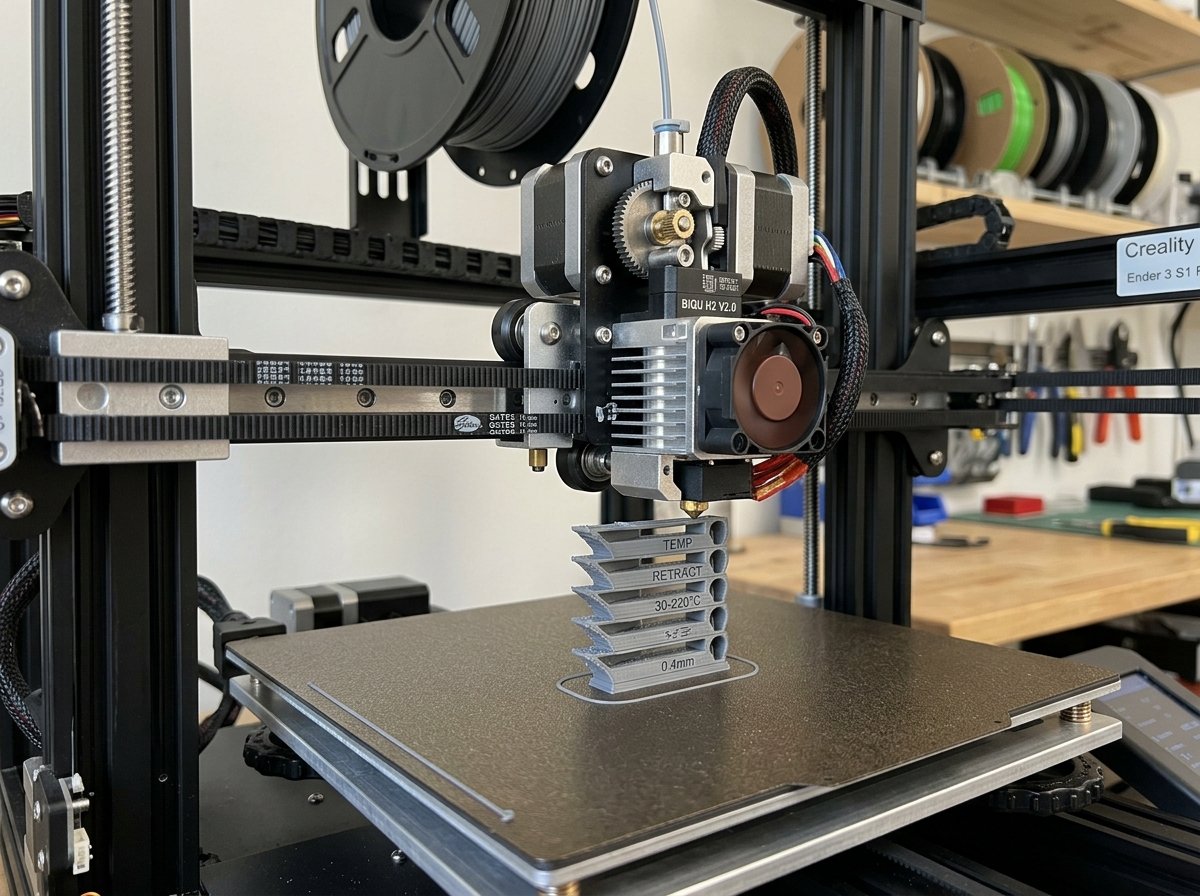
Direct drive extruders require tight 0.4–1.2mm retractions, whereas Bowden tubes need 3.0–6.0mm to overcome line slack.
1. Direct Drive Extruders (Bambu Lab, Voron, Ender 3 V3 KE, Elegoo Centauri Carbon)
Direct drive extruders position the motor gears directly above the hotend heatbreak. Because there is virtually zero slack between the drive gears and the nozzle entrance, retraction distance must remain short and crisp.
- Optimal Retraction Distance: 0.4 mm to 1.2 mm. For most PLA and PETG profiles on hardened steel or bi-metal nozzles, 0.6 mm to 0.8 mm is the sweet spot.
- Optimal Retraction Speed: 30 mm/s to 45 mm/s. Retracting faster than 50 mm/s can grind soft filament or pull air pockets into the melt zone.
- The Over-Retraction Trap: Setting a direct drive extruder to 1.8 mm or 2.5 mm pulls molten filament past the thermal break into the cold heatsink. On enclosed printers, this leads to sudden heat-creep jams after 30 to 45 minutes of printing.
2. Bowden Extruders (Ender 3 V2, CR-10 Series)
Bowden extruders push filament through a long PTFE tube spanning 30 to 50 cm. Because the flexible filament twists and bends inside the tube, a significant portion of the motor movement goes into relaxing tube tension before pressure at the nozzle tip drops.
- Optimal Retraction Distance: 3.0 mm to 6.0 mm.
- Optimal Retraction Speed: 40 mm/s to 60 mm/s.
- Coupler Warning: If your Bowden setup requires more than 6.5 mm of retraction to control stringing, inspect the pneumatic collets at both ends. Loose collets allow the PTFE tube to slip back and forth, wasting your motor's retraction movement.
To systematically calibrate your retraction distance without guessing, follow the automated tower test generation methods outlined in our guide on calibrating filaments in Orca Slicer.
Fine-Tuning Nozzle Temperature and Travel Speeds
Decreasing nozzle printing temperature by 5–10°C reduces plastic fluidity, while raising travel speed to 250+ mm/s minimizes string formation over open gaps by reducing nozzle dwell time.
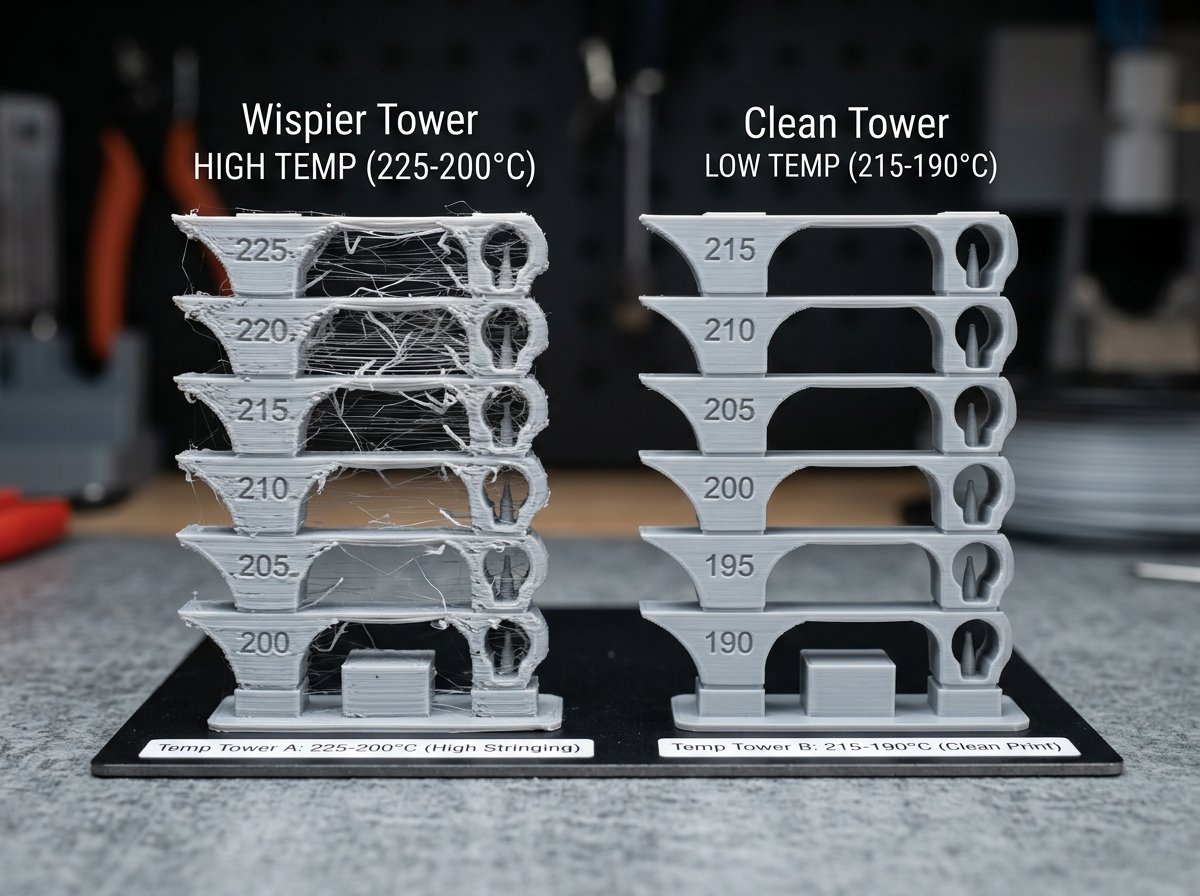
Lowering hotend temperature by 10°C drastically increases polymer viscosity and eliminates fine cobwebbing.
Temperature Calibration Workflow
When searching for ways on how to improve 3d print quality, temperature optimization offers the highest reward with minimal effort. Filament manufacturers typically list generous temperature ranges (such as 220°C–250°C for PETG). Printing at the upper threshold improves maximum volumetric speed, but it also triggers relentless stringing.
- Slice a temperature tower ranging from the maximum recommended temperature down to the lower spec limit in 5°C steps.
- Examine the bridges and vertical travel gaps on each tier.
- Select the lowest temperature that maintains strong layer adhesion and glossy surface finish without extruding rough, dull tracks.
- Real-world Example: On my Bambu Lab P1S printing eSUN PETG, dropping hotend temperature from 245°C down to 235°C completely removed fine hair stringing across open gaps without degrading structural strength.
Travel Speed and Acceleration Tuning
On modern CoreXY kinematics, travel moves do not push plastic and should take place as rapidly as your machine motion system can comfortably manage.
- Travel Velocity: Increase non-printing travel speed to **250 mm/s to 450 mm/s** (or up to 500 mm/s on tuned Voron builds).
- Travel Acceleration: Set travel acceleration to **5,000–10,000 mm/s²**. High acceleration ensures the toolhead reaches full velocity instantly when departing a perimeter wall.
- Mechanism: Rapid movement mechanically shears off tiny liquid plastic tendrils before they have time to stretch into long visible strings.
Advanced Slicer Tweaks: Wipe, Coasting, and Z-Hop
Beyond basic retraction and temperature settings, modern slicers (Orca Slicer, Bambu Studio, PrusaSlicer) provide specialized travel features designed to keep the nozzle exterior clean.
1. Wipe on Retract
Wipe moves the nozzle inward along the perimeter wall for 1 to 2 mm while retracting. This wipes residual plastic droplets against the inside shell of the model before the head steps out into open space.
2. Slope Z-Hop / Spiral Z-Hop
Traditional vertical Z-hop lifts the nozzle straight up by 0.4 mm when retracting. In liquid materials like PETG or TPU, vertical lifting acts like a dip pen, pulling a long vertical string out of the melt chamber. Modern slicers feature Slope Z-Hop, which ramps the toolhead out diagonally while moving, shearing filament threads against the part edge.
Comparative Calibration Matrix for Common Filaments
The table below summarizes baseline calibration starting points across popular FDM materials on direct drive CoreXY printers versus legacy Bowden printers.
| Filament Type | Extruder Type | Optimal Temp Range | Retraction Distance | Retraction Speed | Travel Speed Target |
|---|---|---|---|---|---|
| PLA / PLA+ | Direct Drive | 195°C – 215°C | 0.6 mm – 0.8 mm | 35 mm/s | 300 – 400 mm/s |
| PLA / PLA+ | Bowden Tube | 200°C – 215°C | 4.0 mm – 5.5 mm | 45 mm/s | 200 – 250 mm/s |
| PETG | Direct Drive | 230°C – 240°C | 0.6 mm – 1.0 mm | 30 mm/s | 300 – 450 mm/s |
| PETG | Bowden Tube | 235°C – 245°C | 4.5 mm – 6.0 mm | 40 mm/s | 180 – 250 mm/s |
| TPU (95A) | Direct Drive Only | 210°C – 225°C | 0.4 mm – 0.8 mm | 20 – 25 mm/s | 150 – 250 mm/s |
| ABS / ASA | Direct Drive | 245°C – 260°C | 0.4 mm – 0.8 mm | 40 mm/s | 350 – 500 mm/s |
Frequently Asked Questions (FAQ)
Why does my 3D printer still string after increasing retraction to 2mm?
If you are using a direct drive extruder, increasing retraction past 1.2 mm does not improve stringing. Instead, it pulls softened filament into the cold heatsink zone, causing heat-creep friction or clogs. Excess stringing at 2 mm retraction is usually caused by damp filament or a nozzle temperature that is 10–15°C too hot.
Does wet filament cause stringing even with correct retraction settings?
Yes. Water absorbed into the filament turns into expanding steam inside the melt chamber. The steam expansion forces molten plastic out of the nozzle orifice continuously during travel moves, completely bypassing slicer retraction controls.
What is the difference between stringing and oozing?
Stringing consists of fine, hair-like fibers created when thin threads of plastic stretch across open air gaps during rapid travel moves. Oozing consists of thick plastic drips, blobs, or spurs caused by gravity or thermal expansion when the nozzle pauses or travels slowly.
Should I use Z-Hop to stop stringing?
Standard vertical Z-hop can actually increase fine wispy stringing because pulling the hotend straight up draws liquid plastic out of the tip. If you need Z-hop to avoid knocking over delicate support structures, use Slope Z-Hop or Spiral Z-Hop in Orca Slicer, which shears the thread off horizontally.
About the Author: Dinu Suciu
Dinu Suciu is a practical 3D printing engineer and maker operating an active FDM print farm featuring high-speed CoreXY machines (Bambu Lab P1S, Voron 2.4, Elegoo Centauri Carbon). He specializes in motion system tuning, slicer profile optimization, and functional rapid prototyping. Have a technical question or need commercial print farm advice? Get in touch via our Contact Page.