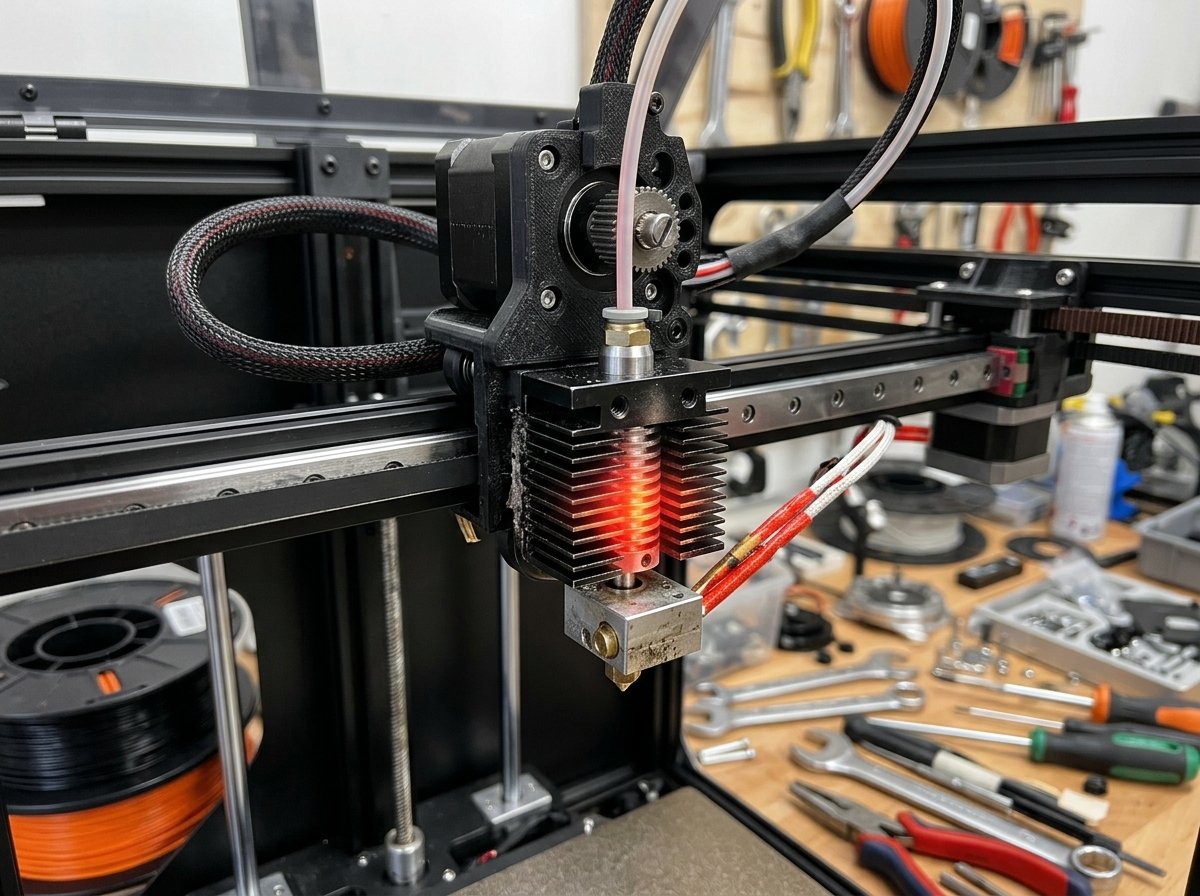
On enclosed CoreXY printers like the Bambu Lab P1S, Creality K1, and Elegoo Centauri Carbon, heat-creep clogs often show up around 30 to 60 minutes into a print. The toolhead keeps moving across the bed, but no filament comes out, and the extruder gears start clicking as they slip on the filament.
Enclosures are useful when printing ABS or ASA because keeping heat inside prevents corner warping and layer splitting. When printing PLA or TPU, however, that trapped heat can raise the chamber temperature above the softening point of the filament. On my machines, this usually causes the filament to swell inside the cold section of the hotend, right above the heatbreak.
This guide covers the main causes of heat creep on enclosed FDM printers, the slicer and hardware settings worth testing, and a step-by-step method to clear an existing clog without damaging the toolhead assembly.
What is Heat Creep and Why Does it Cause Nozzle Clogs?
Heat creep is a thermal condition in FDM 3D printers where heat from the hotend heater block travels upward through the heatbreak into the cold zone heat sink, prematurely softening the filament before it reaches the melt zone.
An FDM hotend relies on a clear temperature boundary between two areas:
- The Melt Zone: The heater block and nozzle at the bottom, operating between 190°C and 300°C to turn solid filament into liquid plastic.
- The Cold Zone: The aluminum heatsink and fan at the top, which must keep incoming filament rigid so the extruder gears can push it down into the nozzle.
Between these two zones sits the heatbreak, a thin metal tube designed to limit thermal transfer. If the heatsink fan moves insufficient air, or if the ambient air inside the chamber is warm, heat travels up the throat. Standard PLA starts softening around 55°C. When the heatsink reaches that range, the extruder gears press against a softened section of filament. The plastic expands sideways inside the cold throat and forms a swollen plug that stops feeding.
Heatsink Efficiency Note: On an open-frame printer, the hotend fan pulls in room air at roughly 20°C–22°C. Inside a closed chamber running a 60°C heated bed, the fan blows air that may be 45°C or higher, reducing heat transfer from the cooling fins.
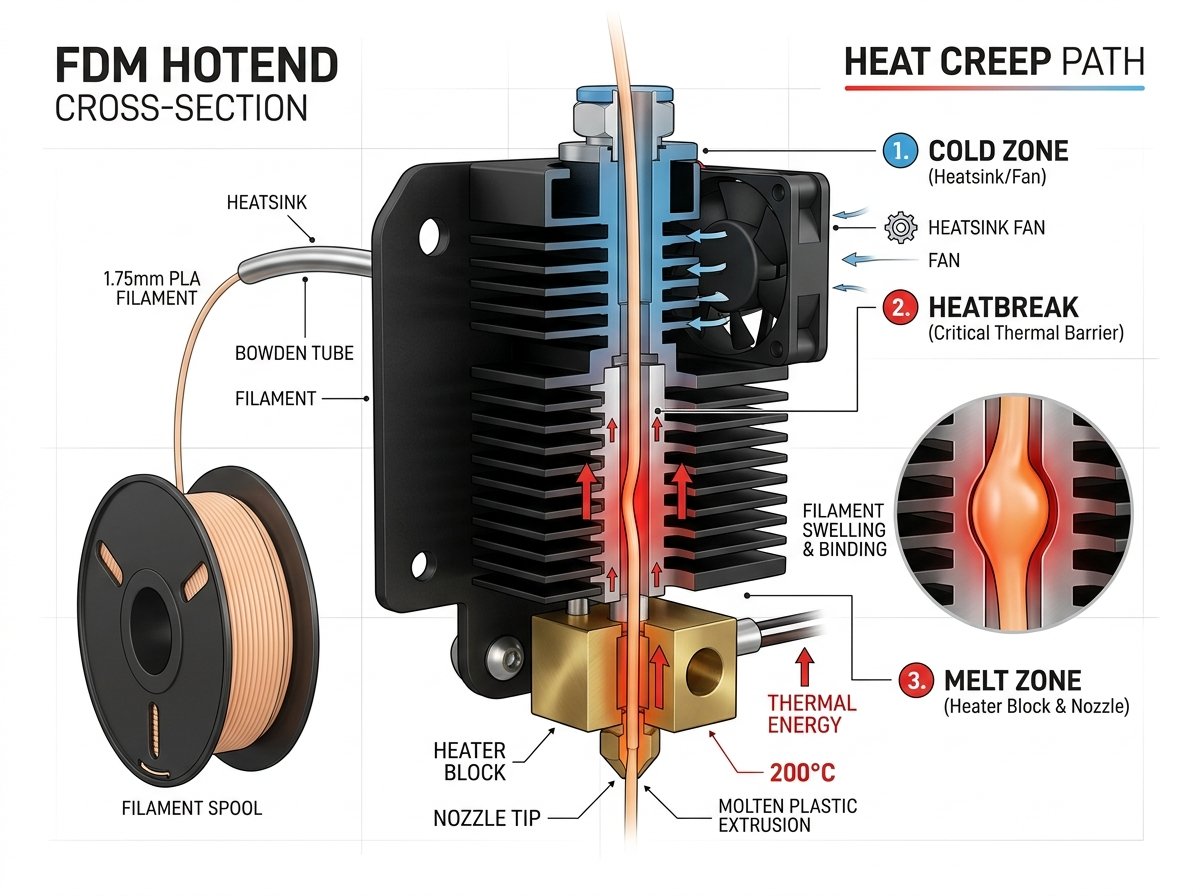
Figure 1: Cross-sectional diagram of an FDM hotend. Heat creeping up past the heatbreak throat causes filament to swell in the heatsink, blocking the path above the melt zone.
Why Enclosed FDM Printers Suffer from PLA Clogging
Enclosed FDM printers cause PLA clogging because their sealed glass doors and top lids trap heat generated by the heated bed and hotend, causing internal chamber air temperatures to rise above PLA's low glass transition threshold (55°C).
In a sealed build chamber with a heated bed running at 60°C for Polymaker PolyLite PLA or Sunlu PLA+, ambient air temperature can steadily climb over the first 45 minutes of printing. As the chamber warms up, several factors combine to increase clogging risk:
- Higher Ambient Air Temperature: The hotend fan recirculates warm air through the heatsink fins, making it harder to keep the upper throat below 50°C.
- Repeated Retractions: Prints with frequent travel moves—such as lattice infill or multiple small parts—pull the softened plastic up and down inside the throat.
- Filament Grinding: As resistance in the throat increases, the extruder drive gears chew into the side of the filament, reducing feeding force and adding plastic dust to the extruder assembly.
This explains why PLA prints often complete fine on short test cubes but fail mid-way through a multi-hour model with intricate geometry.
Step-by-Step Solutions to Stop Heat Creep
To stop heat creep on enclosed FDM printers, you must lower internal chamber temperatures, optimize hotend airflow, adjust slicer retraction settings, and maintain the thermal barrier between the hotend and cold sink.
If you encounter clicking or mid-print feeding stops on PLA, the following adjustments are worth testing in order:
1. Vent the Chamber (Open Top Lid or Door)
For PLA and TPU prints on printers like the Bambu Lab P1S or Creality K1, opening the enclosure is often the first step to test:
- Prop open the top glass lid: Raising the glass top by 1 to 2 inches using a printed riser allows warm air to vent upward.
- Crack the front door: Leaving the front glass door open 2 to 3 inches lowers chamber temperature during long runs.
- Set exhaust fan speed: In OrcaSlicer or Bambu Studio, setting the rear chamber fan to 70%–100% helps exhaust trapped heat.
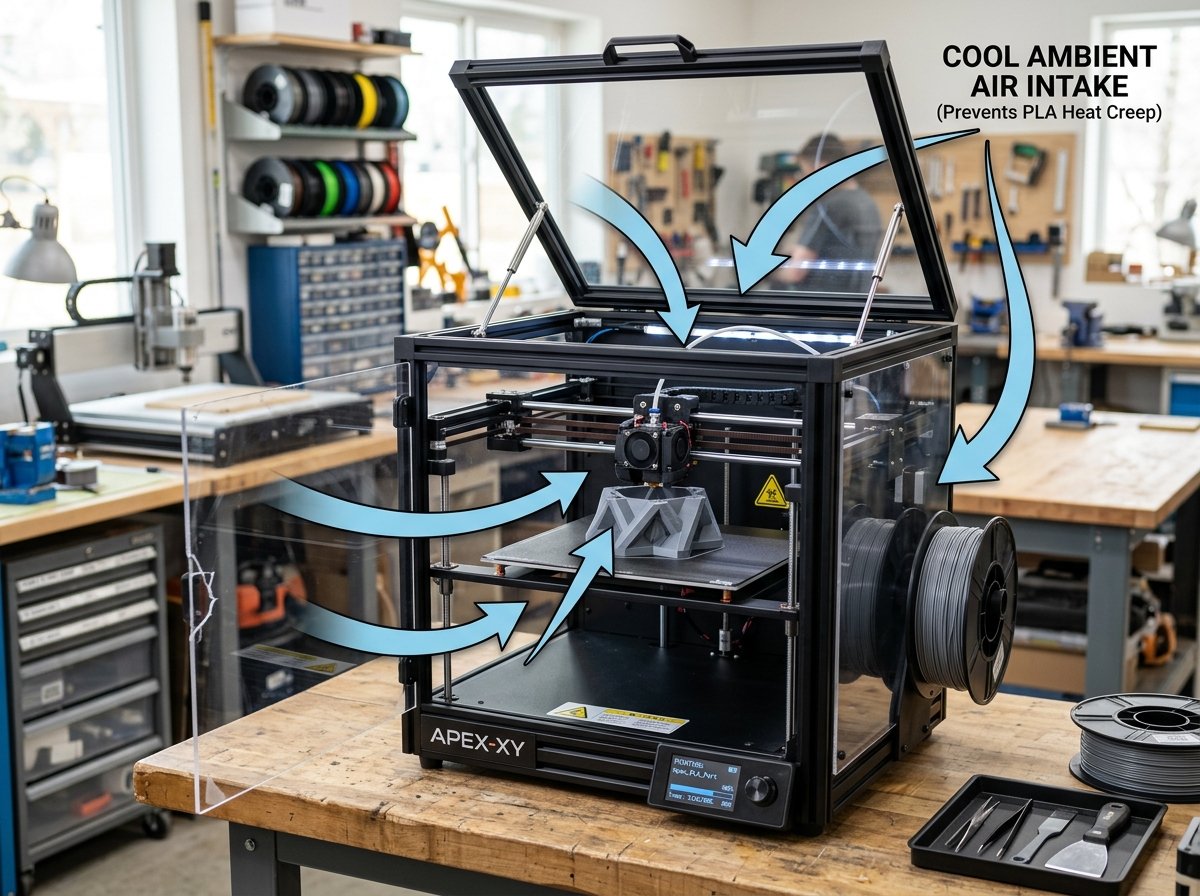
Figure 2: Propping the top lid and cracking the door on an enclosed printer helps maintain lower chamber temperatures during long PLA prints.
2. Inspect the Hotend Fan and Thermal Interface
The heatsink fan must move clean air efficiently to preserve the thermal barrier:
- Clean dust from fan blades: Small 30mm or 40mm axial fans collect fine dust and stray filament strands. Cleaning the blades every 100 print hours can prevent air restriction.
- Check fan orientation: Confirm the fan blows inward toward the heatsink fins, not pulling air away from them.
- Apply thermal paste to upper threads: When assembling a hotend, applying a thin layer of high-temperature thermal paste to the upper threads of the heatbreak (where it enters the heatsink) improves heat transfer out of the throat. Do not apply paste to the lower threads near the heater block.
3. Adjust Retraction Distance and Speed
On direct-drive toolheads, long retraction distances drag warm plastic into the cold zone:
- Reduce retraction distance: Most direct-drive extruders perform best with retractions between 0.4mm and 0.8mm. Settings above 1.2mm increase heat-creep risk on PLA.
- Limit retraction frequency: Enabling retraction counting or minimum travel distance in your slicer limits unnecessary back-and-forth movement over short sections of filament.
- Set travel speeds between 250–350 mm/s: Faster travel moves reduce stringing without needing long retraction distances.
4. Adjust Nozzle Temperature for Slow Speeds
If printing slow outer walls at 20–30 mm/s, high nozzle temperatures (such as 220°C for PLA) give heat more time to travel up the heatbreak. Lowering nozzle temperature to 200°C for slow detail sections reduces heat soak.
Comparative Thermal Management Breakdown
Recommended chamber and cooling configurations vary depending on the filament material being printed:
| Filament Type | Glass Transition (Tg) | Bed Temp | Enclosure Status | Exhaust Fan Duty | Direct Drive Retraction | Heat Creep Risk |
|---|---|---|---|---|---|---|
| PLA / PLA+ | 55°C – 60°C | 50°C – 60°C | Vented (Top/Door Open) | 70% – 100% | 0.4mm – 0.8mm | HIGH |
| TPU / Flexible | Below 20°C | 30°C – 50°C | Vented (Top/Door Open) | 50% – 100% | 0.0mm – 0.4mm | HIGH (Gear Jam) |
| PETG | 75°C – 80°C | 70°C – 80°C | Partially Vented | 30% – 50% | 0.6mm – 1.0mm | MODERATE |
| ABS / ASA | 95°C – 105°C | 90°C – 110°C | Fully Sealed | 0% – 10% (Off) | 0.4mm – 0.8mm | LOW |
| Nylon (PA6/PA12) | 60°C – 90°C | 70°C – 100°C | Fully Sealed | 0% – 20% | 0.5mm – 1.0mm | LOW / MODERATE |
| Polycarbonate (PC) | 140°C – 150°C | 100°C – 120°C | Fully Sealed | 0% (Off) | 0.4mm – 0.8mm | VERY LOW |
How to Unclog an FDM Nozzle After Heat Creep Occurs
To clear a heat creep clog, you must heat the hotend to softening temperature, perform a cold pull (atomic pull) using Nylon or PLA, or clear the cold section of the heatbreak manually.
When a heat-creep clog forms above the melt zone, heating the hotend to 230°C and pushing filament by hand often fails because the plug is located in the unheated cold throat. The following two methods can help clear the blockage:
Method A: Cold Pull (Atomic Pull)
- Heat the hotend to 240°C for PLA (or 260°C for PETG) to soften the bottom of the plug.
- Release the extruder drive gear tension lever or unbolt the extruder motor to access the throat entry.
- Manually push a piece of Nylon or stiff PLA filament into the throat until a small amount extrudes from the nozzle tip.
- Turn off the hotend heater and allow the temperature to drop to roughly 90°C for PLA (or 130°C for Nylon).
- Pull the filament firmly upward using pliers. The cooled plug should pull free, bringing charred debris and the swollen bulb out of the throat.
Method B: Declogging Rod Clearing
- If filament snapped off inside the throat, heat the hotend to 230°C.
- Insert a 1.5mm stainless steel declogging rod down from the top of the throat to push the softened plug into the heater block.
- Flush 100mm of fresh filament through the hotend to clear remaining fragments.
Maker's Workshop Note: On my enclosed CoreXY printer, the clog appeared only after about an hour of printing PLA with the lid closed. Opening the lid fixed the issue on the next print, but only after I also cleaned the hotend fan. The chamber was not the only cause.
For additional mechanical troubleshooting on extruder gear slipping and first-layer adhesion, view our guides on Common FDM 3D Printing Failures and How to Prevent Them and the Elegoo Centauri Carbon FDM 3D Printer.
Frequently Asked Questions (FAQ)
1. Can heat creep damage an FDM 3D printer hotend?
Heat creep rarely causes permanent damage to metal hotends, but prolonged high temperatures in the cold throat can degrade internal PTFE liners. Continuous gear slipping against a jammed plug can also wear down extruder gear teeth over time.
2. Why do heat creep clogs happen mid-print instead of on layer one?
Heat creep requires time for chamber heat to build up. Over 30 to 60 minutes of printing with a 60°C heated bed inside a closed space, chamber air warms up, reducing the hotend fan's ability to keep the heatsink below PLA's softening point.
3. Can a bi-metal heatbreak help reduce heat creep?
A bi-metal heatbreak can improve the thermal barrier, especially on some stock hotends. Its titanium tube limits heat transfer upward, while the copper top section transfers heat into the cooling fins.
4. Should the chamber exhaust fan remain on when printing PLA?
Yes. Running the exhaust fan helps pull warm air out of the build volume, keeping chamber temperatures lower during long PLA runs.
5. Does wet filament increase heat creep risk?
Moisture inside filament turns to steam in the melt zone, creating pressure fluctuations that can push molten plastic upward into the heatbreak during retractions. Thoroughly drying filament can help reduce clogging risk; see our FDM Filament Drying Guide for drying temperature guidelines.
About the Author: Dinu Suciu
Dinu Suciu is an FDM 3D printing practitioner, prototyping engineer, and founder of 3D Print Book. Operating high-speed enclosed CoreXY FDM printers, Dinu focuses on practical material testing, slicer configuration, and routine machine maintenance. Have questions about hotend thermal management? Reach out through our Contact Page.