
Scaling up FDM 3D printing beyond the standard 250 mm desktop cube changes the mechanical equations of resonance, thermal expansion, and filament management. When looking for the best FDM 3D printer in 2026 capable of handling full-scale cosplay helmets, architectural models, and high-volume batch runs without slicing objects into glued segments, two distinct machines dominate the conversation: the Anycubic Kobra 3 Max and the Creality K2 Plus.
While both systems deliver massive build areas and offer automated multi-color feeding, they represent fundamentally opposite mechanical philosophies. The Anycubic Kobra 3 Max expands the traditional open-frame Cartesian bed-slinger format to an colossal 420 × 420 × 500 mm build volume, emphasizing maximum raw cubic space at an accessible entry price. In contrast, the Creality K2 Plus utilizes an enclosed high-speed CoreXY motion architecture with a 350 × 350 × 350 mm chamber, active internal heating, and closed-loop servo motors engineered specifically for warp-sensitive engineering polymers.
In my workshop tests on large-format FDM platforms, operating big build plates introduces real physics challenges that smaller printers never encounter: reciprocating bed momentum, thermal gradients across wide aluminum slabs, multi-color purge times on 40-hour prints, and immense workshop footprint requirements. Below is an exhaustive practical comparison between the Anycubic Kobra 3 Max and the Creality K2 Plus to help you choose the right large-format machine for your workbench.
Table of Contents
- Kinematics & Motion: 420mm Bed-Slinger vs 350mm CoreXY Mechanics
- Build Volume & Footprint: 420×420×500 mm vs 350×350×350 mm
- Thermal Management & Filament Capabilities: Enclosure vs Open Bed
- Multi-Color Feeding Ecosystems: Anycubic ACE Pro vs Creality CFS
- Specification Matrix: Anycubic Kobra 3 Max vs Creality K2 Plus
- Extruder Mechanics, Flow Rates, and Hotend Meltzones
- Power Consumption, Electrical Demands, and Workshop Placement
- Workshop Buyer Verdict: Which Large-Format Machine Fits Your Prints?
- Frequently Asked Questions (FAQ)
- References & External Sources
Kinematics & Motion: 420mm Bed-Slinger vs 350mm CoreXY Mechanics
The primary mechanical distinction between the Anycubic Kobra 3 Max and the Creality K2 Plus lies in kinematic inertia: moving a heavy 420 mm heated aluminum plate back and forth along the Y-axis versus keeping the build plate stationary in XY while a lightweight toolhead glides overhead.
On a Cartesian bed-slinger like the Kobra 3 Max, the heated aluminum bed, magnetic base, steel PEI spring sheet, and printed model all travel along the Y-axis. When printing a full-size wearable helmet or a thick structural fixture, the total moving mass on the Y-axis can easily exceed 3.5 kilograms. Accelerating that much weight at high speeds induces immense momentum. Even with dual Y-axis linear rails and modern Klipper-based resonance compensation (input shaping), rapid direction reversals above 4,000 to 6,000 mm/s² acceleration can introduce visible ringing or layer-line displacement on tall, slender objects.
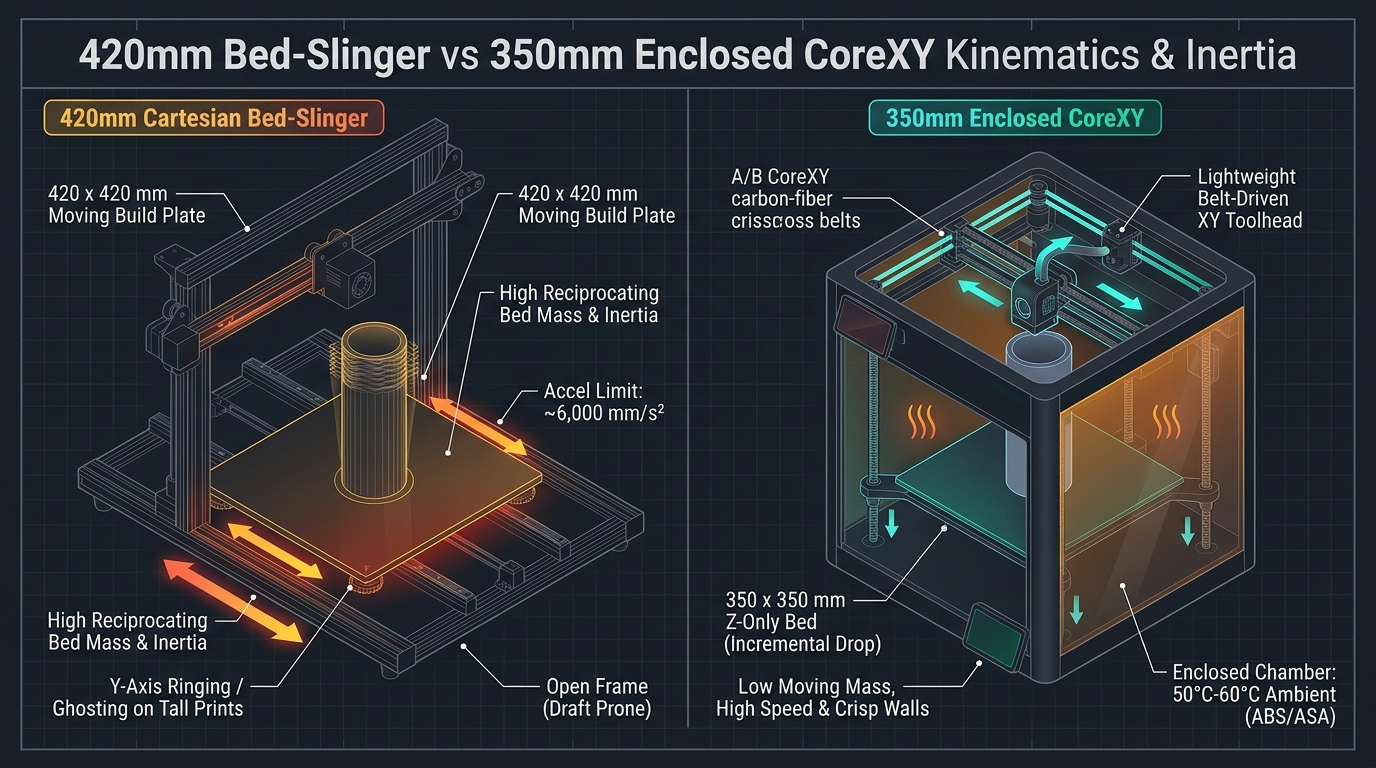
Figure 1: Kinematic comparison showing Cartesian reciprocating Y-bed mass versus enclosed CoreXY stationary Z-axis platform.
To mitigate bed inertia, Anycubic equips the Kobra 3 Max with reinforced aluminum extrusions, dual Z-axis leadscrews tied with a synchronization timing belt, and dual diagonal support braces that tie the top gantry back to the rear chassis. In my workshop tests, running the Kobra 3 Max at outer wall speeds of 150 to 200 mm/s produces clean perimeters on wide-base objects. However, when tall prints climb above 350 mm in height, tapering acceleration down to 3,000 mm/s² helps prevent the upper layers from swaying under violent bed shifts.
The Creality K2 Plus bypasses this physical limitation entirely through its enclosed CoreXY kinematic architecture. The 350 mm build plate only steps downward incrementally along the Z-axis, suspended on four precision leadscrews guided by linear optical axes. The XY motion is handled by two fixed high-torque stepper motors driving continuous belts to maneuver a lightweight toolhead weighing less than 280 grams. Because the workpiece remains stationary during horizontal travels, the K2 Plus comfortably maintains accelerations up to 20,000 mm/s² and speeds up to 600 mm/s without introducing Y-axis ghosting or destabilizing tall, top-heavy models. For a comprehensive technical breakdown of motion systems, review our analysis on CoreXY versus bed-slingers in the modern appliance era.
Build Volume & Footprint: 420×420×500 mm vs 350×350×350 mm
The Anycubic Kobra 3 Max offers an immense 88.2-liter build envelope that accommodates oversized single-piece props, while the Creality K2 Plus provides a compact 42.8-liter volume enclosed inside a fixed exterior footprint.
When selecting a large-format 3D printer, build volume determines what objects can be manufactured without splitting CAD models into interlocking dowels or glued seams. The Anycubic Kobra 3 Max provides a build area of 420 × 420 × 500 mm. That extra 70 mm of X and Y width, combined with 150 mm of additional vertical Z-clearance, makes a massive practical difference for cosplay prop builders. Full-scale sci-fi breastplates, complete Mandalorian helmets, massive drone frames, and architectural site models fit onto the Kobra 3 Max build plate in a single continuous print job.
However, build plate size dictates workshop space planning. Because the Kobra 3 Max is an open bed-slinger, the heated bed travels 210 mm forward and 210 mm backward from center. Factoring in the rear heated bed cable harness and front handle clearance, the Kobra 3 Max requires at least 1,060 mm (over 41 inches) of total table depth to operate without the bed or cable chain colliding with a workshop wall. If you have standard 60 cm (24-inch) workbenches, the Kobra 3 Max will overhang the front and back edges.
The Creality K2 Plus measures 350 × 350 × 350 mm internally. While smaller than the Kobra 3 Max, 350 mm still represents a very generous build envelope capable of fitting 95% of wearable full-face helmets when oriented at a slight angle. Crucially, because the K2 Plus is an enclosed CoreXY cube, its exterior dimensions remain completely static during printing. The machine occupies a stable 495 × 515 × 640 mm footprint on the workbench, making it much easier to integrate into compact maker spaces, production print farms, or standard shelving racks.
Thermal Management & Filament Capabilities: Enclosure vs Open Bed
The open frame of the Anycubic Kobra 3 Max is optimized for large PLA and PETG projects, whereas the actively heated chamber of the Creality K2 Plus allows reliable warping-free printing in ABS, ASA, PC, and nylon.
Thermal control is the decisive factor when choosing between these two machines for functional parts. Large FDM prints suffer from thermal shrinkage: as extruded thermoplastic cools from melt temperatures down to room temperature, polymer chains contract. On large parts spanning 300 mm or more across a build plate, cumulative thermal contraction generates hundreds of Newtons of internal stress. Without a heated ambient enclosure, engineering materials like ABS and ASA will lift PEI spring sheets from their magnetic bases, crack across layer lines, or warp severely at the corners.
"On build plates wider than 300 mm, attempting to print structural ABS or ASA in an open-air workshop usually results in catastrophic delamination. An enclosed chamber with active temperature stabilization is non-negotiable for large-format engineering plastics."
The Anycubic Kobra 3 Max features an open chassis with an 800W AC-powered heated bed capable of reaching 100°C. It handles PLA, High-Speed PLA, PETG, and flexible TPU exceptionally well. The open airflow allows the massive auxiliary cooling fan array to rapidly cool molten PLA, bridging wide spans and locking in crisp surface detail without heat buildup. However, because it lacks an enclosed chamber, printing wide ABS or nylon objects on the Kobra 3 Max is impractical without building a custom external enclosure tent.
The Creality K2 Plus is built specifically for challenging thermal environments. In addition to a 1,000W AC heated build plate reaching up to 120°C, the K2 Plus features a dedicated 800W active chamber heater that circulates warm air up to 60°C inside the fully sealed enclosure. This elevated ambient temperature prevents premature crystallization and relieves internal shrinkage stresses during long prints. In my workshop tests with large automotive ducting printed in ASA, parts produced on the K2 Plus remained dimensionally flat across the entire 350 mm span with zero corner lifting. Both machines include activated carbon air filters, but the sealed seals of the K2 Plus ensure toxic styrene emissions and ultrafine particulates remain contained during high-temperature runs.
Multi-Color Feeding Ecosystems: Anycubic ACE Pro vs Creality CFS
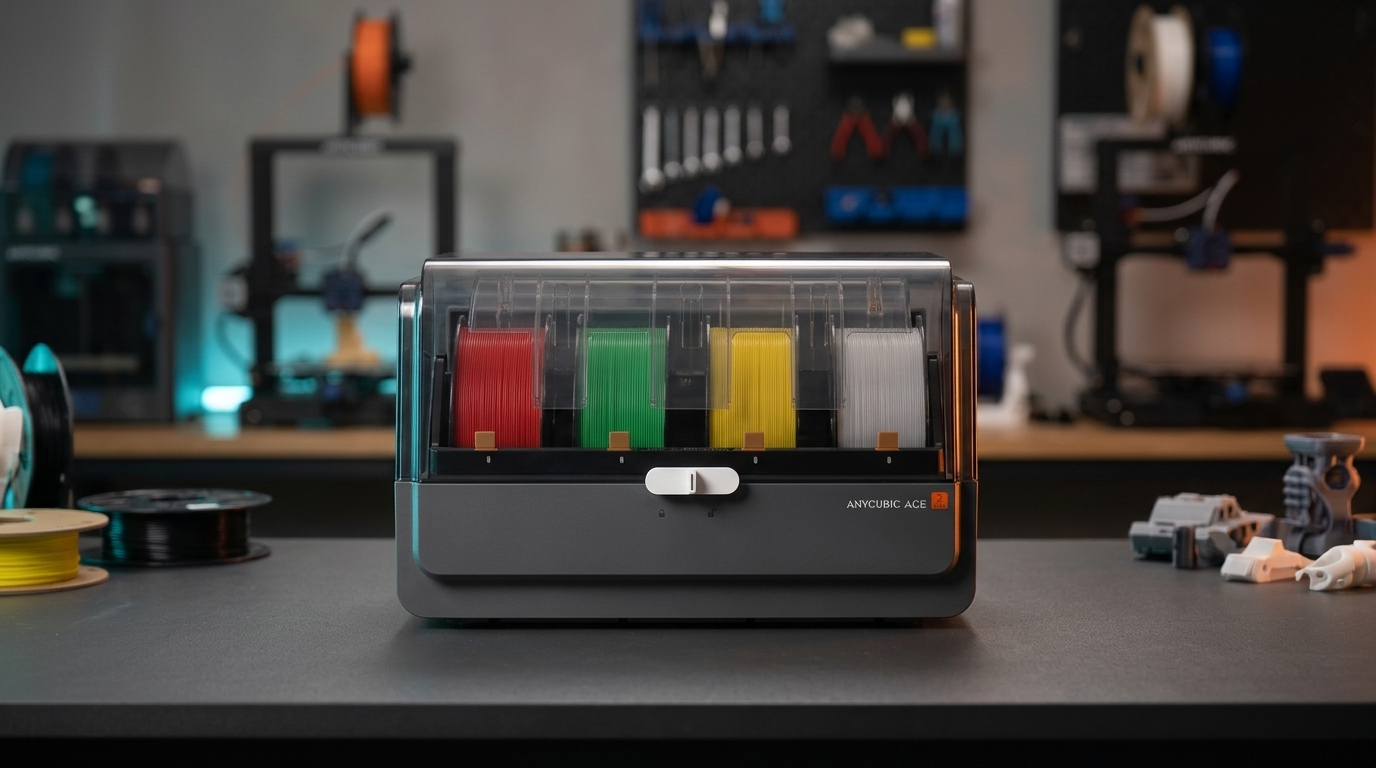
The Anycubic ACE Pro integrates active dual-PTC heated spool drying during production prints, while the Creality CFS focuses on automated RFID filament detection and multi-unit expansion up to 16 colors.
Both printers can be purchased with dedicated automated filament management units that handle spool switching, automated runout replacement, and multi-color printing. However, their internal capabilities address different workshop challenges:

Figure 2: Multi-color management systems: Anycubic ACE Pro active drying chamber versus Creality CFS automated feeding hub.
The Anycubic ACE Pro holds four spools and incorporates dual PTC ceramic heating elements with twin circulating fans. Crucially, the ACE Pro supports Print-While-Drying. Hygroscopic filaments such as PETG, TPU, and water-soluble PVA absorb atmospheric humidity rapidly. When printing a large 36-hour model, filament exposed on an open spool holder can degrade mid-print, resulting in stringing, nozzle popping, and weakened inter-layer adhesion. The ACE Pro actively dries spools at up to 55°C (or 65°C on the ACE 2 Pro unit) throughout the entire print job, keeping filament crisp and dry from the first layer to the final top surface. For full hardware details on the ACE system, consult our Anycubic ACE Pro hands-on review and moisture benchmarks.
The Creality CFS (Creality Filament System) also accommodates four 1-kilogram spools and provides an airtight enclosure with sealed silicone gaskets and desiccant bays. While it does not include active PTC heated air circulation, it excels at software automation. The CFS features integrated RFID readers on each bay that automatically read Creality filament spools, configuring color hex codes, optimal extrusion temperatures, and bed presets in Creality Print or OrcaSlicer. Additionally, up to four CFS units can be daisy-chained to a single K2 Plus via an optional multi-hub, allowing access to 16 distinct colors or materials during a single print.
Regarding filament swap times, the K2 Plus executes color changes in roughly 44 seconds per swap using its rapid toolhead filament cutter and direct-drive buffer. The Kobra 3 Max takes approximately 52 seconds per color cycle. On multi-color models with over 1,000 tool changes, that eight-second difference per swap accumulates to more than two hours saved on the K2 Plus.
Specification Matrix: Anycubic Kobra 3 Max vs Creality K2 Plus
Comparing the technical specifications of the Anycubic Kobra 3 Max against the Creality K2 Plus Combo alongside benchmark high-speed alternatives illustrates how hardware capabilities align across different maker budgets.
| Feature / Metric | Anycubic Kobra 3 Max | Creality K2 Plus Combo | Elegoo Centauri Carbon | Flashforge Adventurer 5M |
|---|---|---|---|---|
| Build Volume (X × Y × Z) | 420 × 420 × 500 mm (88.2 L) | 350 × 350 × 350 mm (42.8 L) | 256 × 256 × 256 mm (16.7 L) | 220 × 220 × 220 mm (10.6 L) |
| Kinematics & Motion | Cartesian Bed-Slinger (Dual Y-Rails) | Enclosed CoreXY (Precision Rails) | Enclosed CoreXY (Linear Rails) | Enclosed CoreXY (Linear Rods) |
| Max Toolhead Speed / Accel | 500 mm/s • 10,000 mm/s² | 600 mm/s • 20,000 mm/s² | 500 mm/s • 20,000 mm/s² | 600 mm/s • 20,000 mm/s² |
| Multi-Color Feeder | ACE Pro (4 Spools, up to 8) | CFS (4 Spools, up to 16) | CANVAS (4 Spools, up to 16) | Single Spool (Optional Multi) |
| Active Spool Drying | Yes (Active Print-While-Drying 55°C) | Passive (Sealed Desiccant Bays) | Passive (Desiccant Chambers) | None (External Dryer Required) |
| Active Chamber Heating | No (Open-Air Frame) | Yes (Dedicated 800W Heater to 60°C) | Passive Chamber Retention | Passive Chamber Retention |
| Max Hotend Temperature | 300°C (All-Metal Quick-Swap) | 350°C (Unicorn Bimetal Nozzle) | 320°C (Hardened Steel) | 280°C (Quick-Release Nozzle) |
| Max Heated Bed Temp | 100°C (800W AC Bed) | 120°C (1,000W AC Multi-Zone) | 110°C (AC Heated) | 110°C (DC Heated) |
| Primary Target Materials | PLA, High-Speed PLA, PETG, TPU | ABS, ASA, PETG-CF, PA-CF, PC, PLA | PLA, PETG, ABS, ASA, TPU | PLA, PETG, ABS, ASA, TPU |
| Firmware & Connectivity | Kobra OS (Klipper Base) / Wi-Fi / App | Creality OS (Rooted Klipper) / LAN / Eth | Klipper Base / Wi-Fi / LAN | Klipper Base / Wi-Fi / USB |
| Check Best Price | Check Price | Check Price | Check Price | Check Price |
Save on Large-Format FDM Printers & Multi-Color Combos
Investing in large-volume 3D printers and multi-spool automated dryboxes represents a significant workshop equipment upgrade. Before ordering your next large-format setup, check our verified 3D Printing Deals & Coupons page for active seasonal discounts, manufacturer promo codes, and bundle packages across Anycubic, Creality, and Elegoo.
Extruder Mechanics, Flow Rates, and Hotend Meltzones
The Creality K2 Plus features a 350°C high-flow Unicorn nozzle delivering up to 40 mm³/s volumetric throughput, whereas the Anycubic Kobra 3 Max utilizes a 300°C quick-swap hotend pushing up to 32 mm³/s.
When printing objects that span 350 to 420 mm in dimension, volumetric flow rate becomes the primary bottleneck determining print duration. A machine moving at 300 mm/s with a standard 0.4 mm nozzle and 0.2 mm layer height requires roughly 24 mm³/s of plastic flow. However, large prints are much better suited to 0.6 mm or 0.8 mm nozzles to cut print times from 40 hours down to 18 hours. With larger nozzles, your hotend meltzone must liquefy plastic at sustained rates above 30 mm³/s.
The Kobra 3 Max incorporates a dual-gear direct-drive extruder with a hardened steel meltzone rated for 300°C. In my workshop volumetric flow calibrations with standard PLA and PETG, the Kobra 3 Max reliably maintained 28 to 32 mm³/s without extruder motor clicking or layer under-extrusion. Hotend replacement utilizes a quick-release locking lever that allows swapping between 0.4 mm and 0.6 mm nozzles in approximately 90 seconds.
The Creality K2 Plus utilizes Creality's unified bimetallic Unicorn nozzle assembly, which integrates a titanium-alloy heatbreak directly with a hardened steel nozzle tip. Driven by a high-torque closed-loop stepper motor, the meltzone reaches up to 350°C and achieves maximum volumetric flow rates between 38 and 42 mm³/s with high-flow materials. This extra volumetric capacity allows the K2 Plus to run 0.6 mm nozzles at 250 mm/s, significantly accelerating production times on dense structural prototypes.
Power Consumption, Electrical Demands, and Workshop Placement
Large heated beds require substantial electrical power, drawing between 800W and 1,200W during initial bed heating, requiring careful circuit planning in home workshops.
A factor often overlooked by makers upgrading from standard 220 mm printers is electrical power draw. Heating a 420 × 420 mm sheet of aluminum to 80°C or a 350 × 350 mm bed to 100°C demands serious wattage. Both the Kobra 3 Max and the K2 Plus use AC-powered heated beds connected directly to mains voltage via solid-state relays (SSR). This design avoids passing massive 30-amp currents through low-voltage DC power supplies, allowing rapid heating to 60°C in under three minutes.
However, during initial warm-up, the Anycubic Kobra 3 Max draws approximately 800W from the wall outlet. The Creality K2 Plus, when running both its 1,000W heated bed and its 800W active chamber heater simultaneously, can pull a peak surge of 1,200W to 1,400W for the first five minutes of heating. In a home workshop sharing a single 15-amp or 16-amp breaker circuit with space heaters, vacuum cleaners, or other 3D printers, running multiple large machines concurrently requires calculating circuit capacity to avoid tripping breakers.
In terms of acoustic footprint, the enclosed CoreXY design of the K2 Plus significantly attenuates toolhead and fan noise, operating around 48 to 52 dB(A) with the front glass door closed. The Kobra 3 Max, being an open-frame bed-slinger with high-output auxiliary cooling fans and an oscillating 420 mm bed, generates around 56 to 60 dB(A) during high-speed runs. If the printer will reside in an office or living area, the enclosed K2 Plus provides much quieter day-to-day operation.
Workshop Buyer Verdict: Which Large-Format Machine Fits Your Prints?
The Anycubic Kobra 3 Max is the superior value for makers focused on massive cosplay props and decorative PLA/PETG models at an unmatched price per cubic liter, while the Creality K2 Plus is the definitive choice for functional engineering parts in ABS, ASA, and composite filaments requiring high speed and heated chamber reliability.
Maker's Workshop Note: Practical Reliability on the Bench
In my workshop tests across large-format FDM printers, choosing between these two machines depends on what you print and where you place the hardware. If your primary goal is printing wearable full-size armor, giant display models, or large batch trays of PLA figurines, the Anycubic Kobra 3 Max provides unbeatable volume for the money. Its 420 × 420 × 500 mm build space eliminates model slicing, and the active drying ACE Pro unit ensures your PETG spools remain completely moisture-free during multi-day prints. Just ensure you have a dedicated deep workbench with over one meter of clear Y-axis clearance.
On the other hand, if your workshop produces functional mechanical parts, automotive brackets, or outdoor housings in ASA, ABS, or carbon-fiber composites, the Creality K2 Plus is worth the investment. Its enclosed CoreXY motion platform, actively heated 60°C chamber, 350°C hotend, and compact stationary footprint deliver consistent dimensional accuracy that an open bed-slinger simply cannot match on warp-prone materials. For broader category recommendations, explore our curated Best FDM 3D Printers 2026 comprehensive buying guide.
Frequently Asked Questions (FAQ)
1. Can the Anycubic Kobra 3 Max print ABS or ASA without an enclosure?
While small ABS or ASA parts under 50 mm in size may print with a brim, large-scale functional parts will warp, lift from the build plate, and delaminate due to room drafts and rapid cooling. To reliably print engineering filaments on the Kobra 3 Max, you must place the machine inside a large thermal enclosure tent.
2. How much bench depth is required to operate the Kobra 3 Max safely?
Because the 420 mm heated bed travels forward and backward along the Y-axis, the Kobra 3 Max requires at least 1,060 mm (approximately 42 inches) of total table depth. This ensures proper clearance for the bed travel and the rear heated cable harness without hitting walls.
3. Does the Creality K2 Plus active chamber heater require external venting?
The K2 Plus features built-in activated carbon exhaust filtration that captures airborne odors and volatile organic compounds during ABS printing. However, if you run high-volume production in poorly ventilated living areas, connecting a 4-inch exhaust duct to a window or external vent is recommended.
4. Can both printers use third-party filaments in their multi-color hubs?
Yes. Both the Anycubic ACE Pro and the Creality CFS accept standard 1.75 mm filament spools from third-party manufacturers including Polymaker, Sunlu, eSUN, and Elegoo. For cardboard spools, snapping plastic adapter rings onto the spool edges prevents dust accumulation inside the feed mechanisms.
5. What nozzle sizes are best for large-format FDM 3D printing?
While a 0.4 mm nozzle provides crisp fine detail, printing large-format objects often takes 30 to 60 hours. Switching to a 0.6 mm or 0.8 mm high-flow nozzle increases layer heights to 0.3 or 0.4 mm and widens line extrusion, cutting total print times by 40% to 60% while dramatically improving part strength.
Related Guides & Next Steps
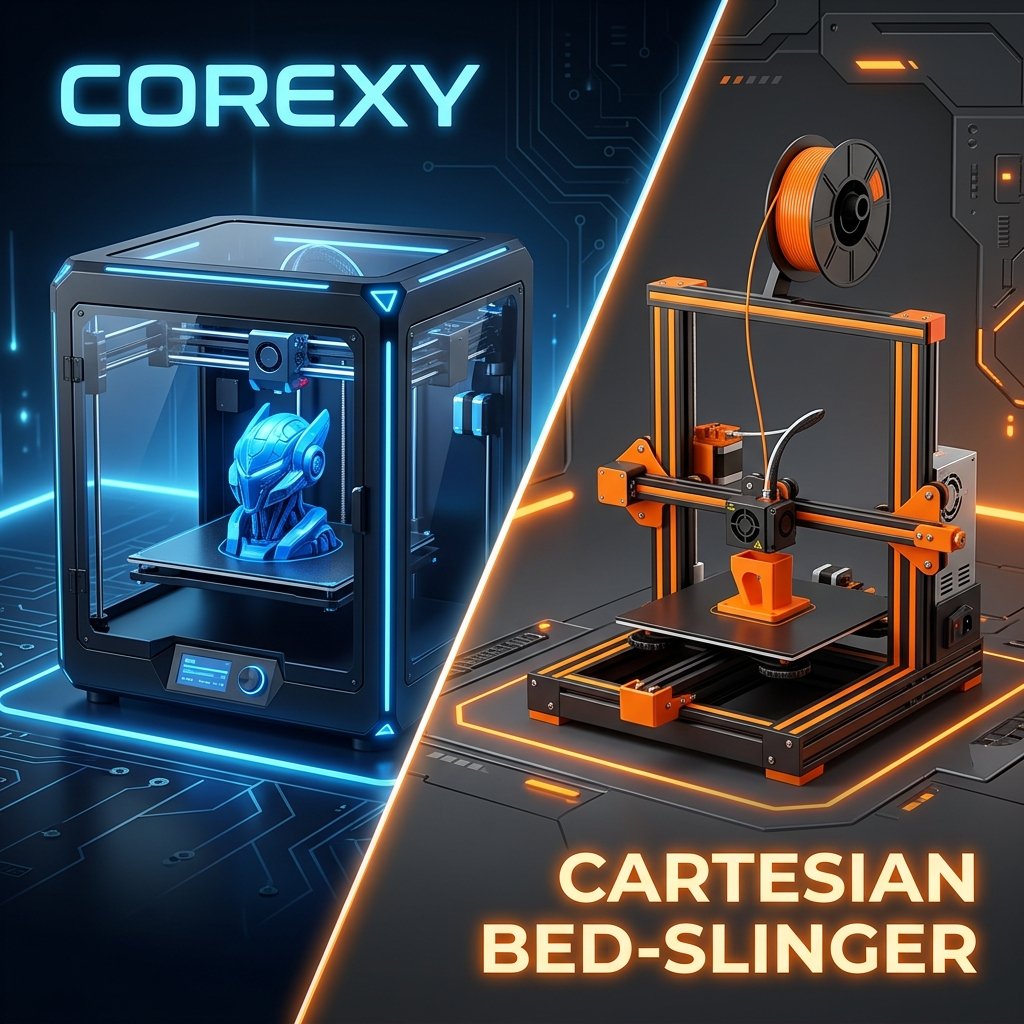
CoreXY vs Bed-Slingers: Why the Appliance Era Matters
Explore the mechanical differences, speed advantages, and why CoreXY appliance-style 3D printers are dominating FDM 3D printing in 2026.
Best FDM 3D Printers 2026: Top Picks & Buyer's Guide
Choosing the right FDM 3D printer in 2026 can be overwhelming due to rapid technological shifts like high-speed CoreXY systems and multi-color printing. This guide highlights the best models.
References & External Sources
- Anycubic Official Wiki: Kobra Series Multi-Color Hardware Documentation & Setup
- Klipper 3D Official Documentation: Kinematics & Motion System Mechanics (CoreXY vs Cartesian)
- Klipper 3D Documentation: Resonance Compensation & Input Shaping Tuning Guides
- Prusa Research Knowledge Base: Drying Hygroscopic FDM Filaments (Temperatures & Methods)
About the Author: Dinu Suciu
I am Dinu Suciu, founder and prototyping maker at 3D Print Book. Operating an active workshop equipped exclusively with desktop FDM 3D printers—spanning enclosed CoreXY platforms and high-speed direct-drive setups—I focus on multi-material reliability, filament moisture control, and repeatable print workflows for functional parts. Have a question about large-format setups or custom prototyping? Reach out directly through our Contact Page.