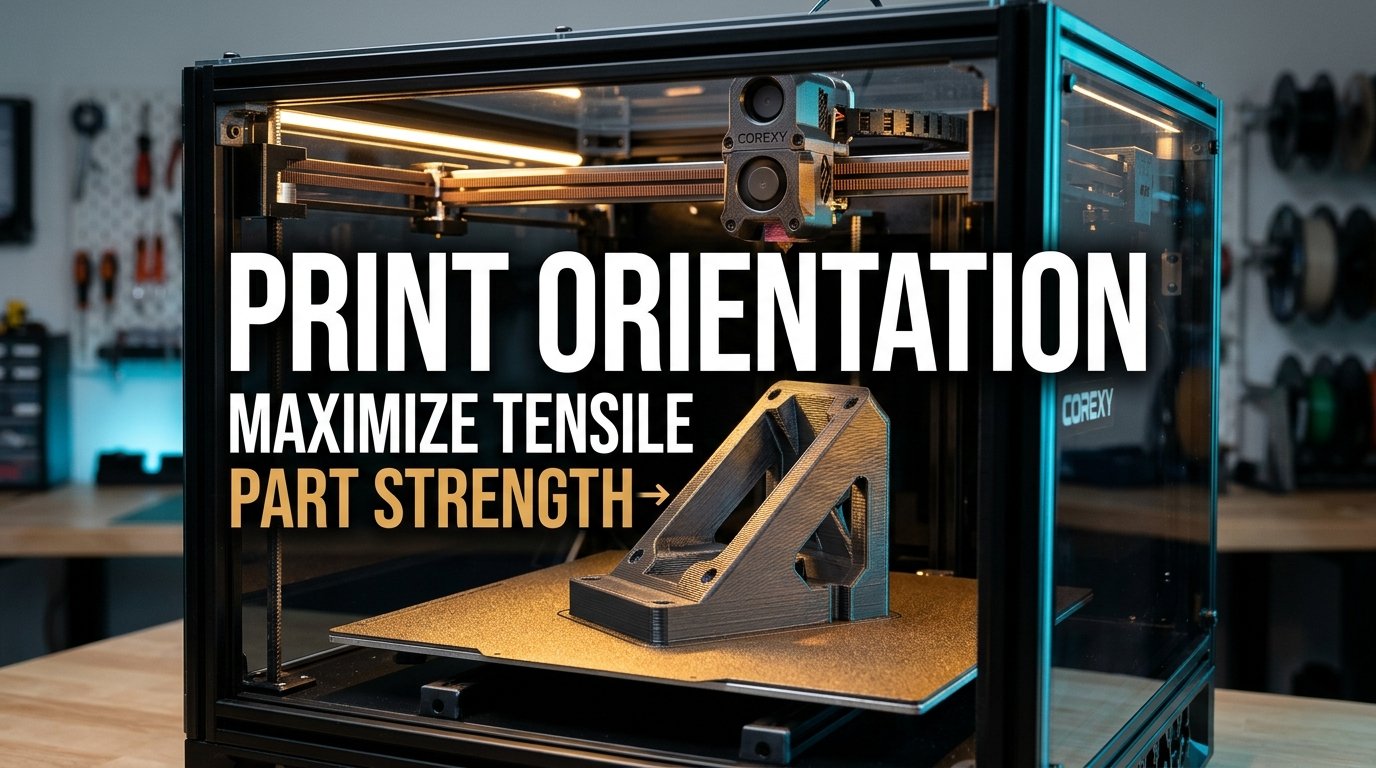
One of the most disheartening experiences in functional additive manufacturing is watching a newly printed mechanical bracket snap under minimal working load. A maker spends hours designing a sturdy wall mount, shelf bracket, or motor housing, packs the slicer profile with six perimeter walls and 60% infill, and prints the part standing tall to fit multiple objects on the build plate. Yet during its first minute in service, the component shears cleanly in half along a microscopic horizontal seam under a fraction of its anticipated mechanical payload.
When functional components fail prematurely, beginners frequently blame their filament brand, suspect bad extrusion calibration, or crank infill density up to 100%. In reality, the root cause is almost always mechanical anisotropy: the fundamental physical law governing Fused Deposition Modeling (FDM) where parts exhibit dramatically different strength characteristics depending on their spatial orientation on the build plate. Because FDM parts are built layer by layer, extruded polymer strands fuse with maximum tensile strength along the X/Y travel path, while the vertical Z-axis bond remains inherently vulnerable to peeling and shear forces.
In this engineering guide, I break down the polymer mechanics behind FDM anisotropy, quantify the real-world 40% to 60% Z-axis tensile deficit across common materials, and provide actionable slicer strategies—including diagonal 45-degree angle tilting, stress-vector alignment, and perimeter interlocking—to help you learn how to improve 3D print strength without needlessly wasting filament.
Table of Contents
- The Physics of Anisotropy: Polymer Chain Alignment vs. Interlayer Fusion
- The Anisotropy Penalty: Quantifying the 40%–60% Z-Axis Strength Deficit
- Mapping Mechanical Stress Vectors: Tensile, Shear, and Bending Loads
- Build Plate Slicing Benchmark: Orientation vs. Tensile Yield Matrix
- Workshop Sourcing Tip: High-Tensile Filaments & Reinforcement Hardware
- The 45-Degree Slicing Strategy: Defeating Single-Plane Shear Cleavage
- Geometry & Support Trade-offs: Sacrificial Overhangs vs. Structural Integrity
- Advanced Slicer Tuning: Perimeter Interlocking, Infill Angles, and Layer Heights
- Maker's Workshop Note: Empirical Tensile Benchmarking on Functional Cantilever Brackets
- Frequently Asked Questions (FAQ)
- References & External Sources
- About the Author: Dinu Suciu
The Physics of Anisotropy: Polymer Chain Alignment vs. Interlayer Fusion
FDM parts are mechanically anisotropic because continuous polymer molecular chains align parallel to the nozzle extrusion path during deposition, whereas adhesion between adjacent vertical layers relies solely on secondary thermal re-melting and microscopic macromolecular diffusion.
To grasp why print orientation dictates structural survival, we must look at how molten thermoplastic behaves inside the extruder melt zone and upon deposition onto the print bed. Inside the hotend barrel, amorphous or semi-crystalline polymers (such as PLA, PETG, ABS, or PA) are pushed through an orifice—typically 0.4mm or 0.6mm in diameter—under substantial hydrodynamic shear pressure. This extrusion process forces long, tangled polymer molecular chains to stretch and align linearly along the direction of toolhead motion.
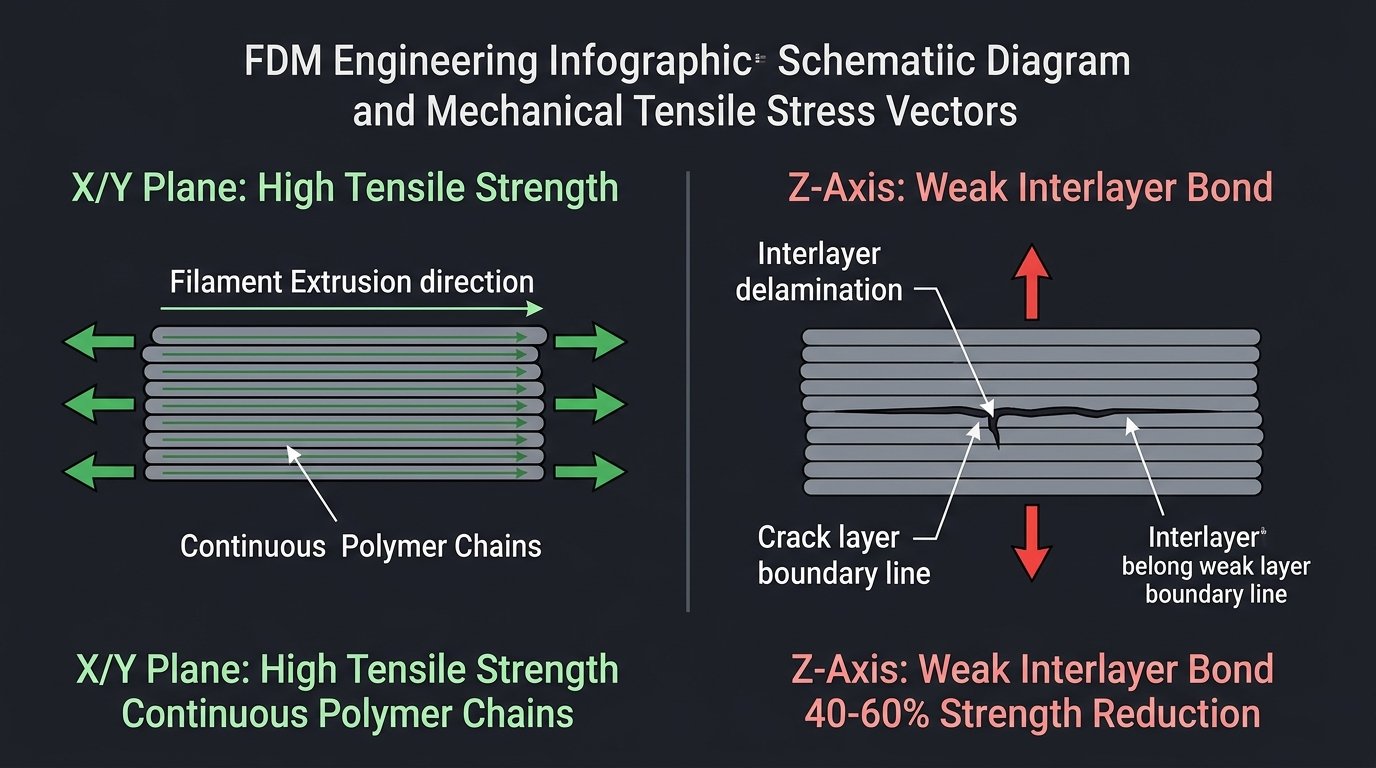
Figure 1: Cross-sectional mechanics of FDM anisotropy. Longitudinal forces along the extrusion bead (X/Y) pull against continuous covalent polymer chains, while vertical forces (Z) pull against localized neck diffusion welds.
When an extruded filament bead lands on the build surface, it retains exceptional tensile integrity along its longitudinal axis. Tensile loads applied parallel to this extrusion bead are resisted by strong covalent chemical bonds within the polymer backbone. However, the interface between layer N and layer N+1 is an entirely different mechanical environment:
- Sub-Melting Contact Temperatures: The previously printed lower layer has already cooled down to the ambient chamber or heated bed temperature (often 35°C to 65°C), well below its melting point.
- Restricted Polymer Diffusion: When the hot nozzle deposits fresh polymer at 210°C–260°C, the interfacial contact zone remains in a semi-molten state for mere fractions of a second before convective cooling solidifies the bead. Polymer chains on either side of the weld boundary have insufficient thermal dwell time to interlock deeply.
- Microscopic Void Formation: Because extruded tracks have rounded cross-sectional profiles (stadium-shaped geometry), small triangular voids naturally form between adjacent beads. These interfacial micro-notches act as stress concentrators where micro-cracks originate under mechanical tension.
Consequently, an FDM component behaves mechanically much like natural hardwood: it exhibits tremendous resistance when loaded along the "grain" (the continuous extrusion path), but splits easily when loaded perpendicular to the grain across adjacent layer boundaries. For practical guidelines on maximizing thermal contact and weld bonding, explore our deep dive on how to improve 3D print layer adhesion.
The Anisotropy Penalty: Quantifying the 40%–60% Z-Axis Strength Deficit
The anisotropy penalty represents the measurable structural loss between horizontally printed specimens and vertically printed specimens, typically manifesting as a 40% to 60% reduction in ultimate tensile strength and up to an 80% reduction in impact ductility.
Standardized materials testing protocols, such as ASTM D638 (Standard Test Method for Tensile Properties of Plastics) and ISO 527, reveal striking performance discrepancies when identical test specimens are printed in different spatial orientations:
- Flat Orientation (XY Plane): Tensile dogbones printed flat on the build plate align their outer walls and infill tracks directly along the axis of tension. In this orientation, premium PLA can achieve tensile yield strengths between 50 MPa and 65 MPa, while engineering PETG reaches 45 MPa to 55 MPa.
- On-Edge Orientation (XZ Plane): Parts printed on their narrow edges also maintain continuous perimeters along the major tensile axis, offering virtually identical yield strength to flat prints, with subtle variations determined by perimeter-to-infill ratio.
- Upright Vertical Orientation (Z-Axis): When the dogbone stands vertically like a tower, every single layer plane is oriented perpendicular to the pulling force. Under tensile load, failure does not occur through plastic necking or polymer yielding; instead, the specimen experiences sudden, brittle cleaving along a single layer interface at just 20 MPa to 28 MPa—a staggering 55% drop in mechanical load capacity.
Maker's Workshop Principle: You cannot compensate for bad print orientation simply by increasing wall count or infill percentage. A vertical cantilever beam with 100% solid infill will still fracture under less bending force than a hollow 3-perimeter beam printed horizontally.
This structural discrepancy becomes even more pronounced when using fiber-reinforced filaments, such as Carbon Fiber Nylon (PA-CF) or Carbon Fiber PETG. The chopped carbon fibers align strictly along the extrusion track during nozzle passage. While this dramatically increases stiffness and tensile modulus along the X/Y plane, the fibers cannot bridge across horizontal Z-layer seams. In fact, fiber-filled materials often display higher Z-axis brittleness than neat polymers, penalizing improper orientation even more severely.
Mapping Mechanical Stress Vectors: Tensile, Shear, and Bending Loads
Effective print orientation requires identifying the primary mechanical stress vectors acting on a component—specifically tensile, shear, torsional, and bending loads—and rotating the CAD model so that continuous perimeter loops oppose the dominant tension vectors.
Before exporting an STL or 3MF file to your slicing software, perform a quick mental free-body diagram of the installed component. Mechanical forces rarely act as pure, isolated loads; most practical functional parts endure combinations of three distinct stresses:
1. Cantilever Bending Moments
Consider an L-bracket mounted to a wall supporting a downward shelf load. The horizontal arm acts as a cantilever beam. Downward force at the tip produces a bending moment that induces maximum tensile stress along the upper surface of the horizontal arm, while the lower surface experiences compressive stress. If the bracket is printed flat on its back, the upper perimeters run continuously from the vertical mounting flange to the shelf tip, resisting bending with full tensile capability. Conversely, if printed standing upright, the tensile stress acts perpendicular to the layer seams, snapping the bracket right at the 90-degree corner.
2. Fastener Clamp and Pull-Through Forces
Bolted joints generate intense compressive clamp loads and radial hoop expansion when screws are torqued down. If a bolt passes vertically through a stack of horizontal layers, tightening the screw presses the layers together in compression—a stress mode where FDM parts excel. However, if the bolt axis runs parallel to the layer lines, the wedge effect of a countersunk screw head or the expansion of an insert can split the layer perimeters apart like an axe through firewood. To avoid splitting fastener holes, refer to our modeling guide on designing 3D printed threads and bolts.
3. Torsional and Shear Planes
Rotational shafts, gear drives, and mounting pins endure torsional shear stresses that act diagonally across the material matrix. When shear forces align coincident with a flat horizontal layer boundary, the interfacial weld yields easily. Orienting rotating pins at an angle forces shear planes to cross multiple intersecting extrusion tracks, dramatically improving shear fatigue endurance.
Build Plate Slicing Benchmark: Orientation vs. Tensile Yield Matrix
The following engineering reference matrix contrasts tensile yield strength, elongation at break, surface quality, and support requirements across common FDM materials tested under ASTM D638 standard geometries at 0°, 45°, and 90° build angles:
| Filament Polymer | Build Orientation | Tensile Strength (MPa) | Elongation at Break (%) | Z-Axis Deficit (%) | Support Material Required |
|---|---|---|---|---|---|
| Standard PLA (Basic) | Flat (0° XY Plane) | 58.4 MPa | 6.2% | 0% (Baseline) | None (Self-supporting) |
| Standard PLA (Basic) | Angled (45° Tilt) | 46.2 MPa | 4.1% | -20.8% | Moderate (Tree/Slim supports) |
| Standard PLA (Basic) | Upright (90° Z-Axis) | 24.8 MPa | 1.8% | -57.5% | None (Small bed contact) |
| Engineering PETG | Flat (0° XY Plane) | 51.2 MPa | 9.4% | 0% (Baseline) | None (Self-supporting) |
| Engineering PETG | Angled (45° Tilt) | 42.7 MPa | 6.8% | -16.6% | Moderate (Tree supports) |
| Engineering PETG | Upright (90° Z-Axis) | 28.5 MPa | 2.5% | -44.3% | None (Requires brim) |
| ABS / ASA Technical | Flat (0° XY Plane) | 44.0 MPa | 7.5% | 0% (Baseline) | None (Self-supporting) |
| ABS / ASA Technical | Angled (45° Tilt) | 35.8 MPa | 4.6% | -18.6% | Moderate (Chamber heated) |
| ABS / ASA Technical | Upright (90° Z-Axis) | 19.2 MPa | 1.4% | -56.3% | High Delamination Risk |
| Carbon Fiber Nylon (PA-CF) | Flat (0° XY Plane) | 82.6 MPa | 4.8% | 0% (Baseline) | None (Hardened nozzle) |
| Carbon Fiber Nylon (PA-CF) | Angled (45° Tilt) | 61.5 MPa | 3.0% | -25.5% | Moderate (Enclosed setup) |
| Carbon Fiber Nylon (PA-CF) | Upright (90° Z-Axis) | 31.4 MPa | 1.1% | -62.0% | Extreme Cleavage Risk |
Workshop Sourcing Tip: High-Tensile Filaments & Reinforcement Hardware
Achieving peak mechanical strength across complex load vectors demands reliable materials with tight diameter tolerances and robust interlayer weld characteristics. When printing heavy-duty functional brackets, upgrading from basic PLA to premium high-flow PETG, impact-modified PLA+, or abrasive Carbon-Fiber composites requires quality hardened nozzles and dependable drybox storage.
Before kicking off your next multi-day functional prototyping run, check out our verified maker discounts on engineering filaments, hardened toolheads, and workshop essentials at 3D Printing Deals & Coupons.
The 45-Degree Slicing Strategy: Defeating Single-Plane Shear Cleavage
The 45-degree slicing strategy defeats single-plane shear cleavage by rotating the component at an oblique angle relative to the build plate, forcing fracture paths to navigate through multiple intersecting filament perimeters rather than cleanly cleaving along a single flat layer interface.
When an engineer designs a complex structural part—such as a tripod mount, robotic arm link, or suspension upright—mechanical loads rarely travel along a single pristine Cartesian axis. If you orient the component flat along the X/Y plane, it will resist primary bending but remain vulnerable to secondary axial twisting. If you stand it upright, it cleaves instantly under tension.
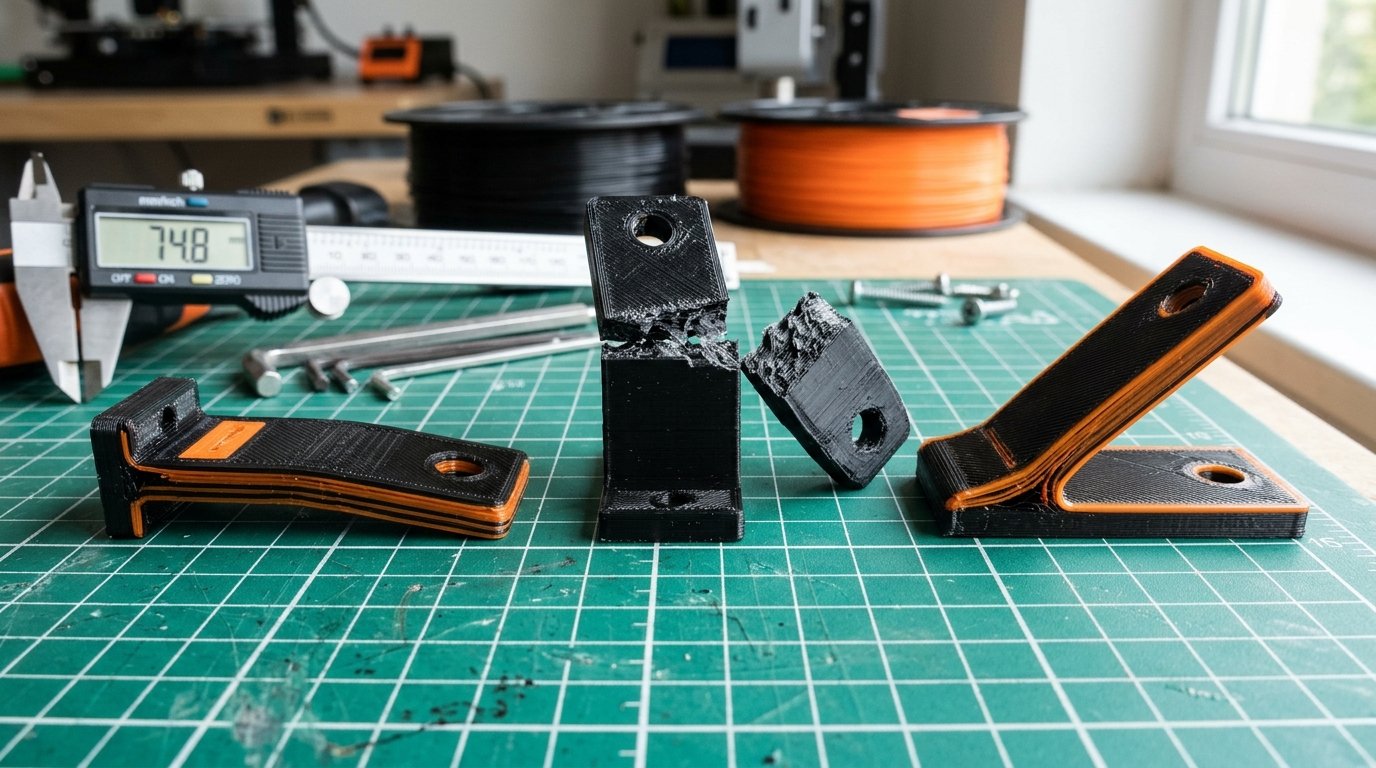
Figure 2: Physical workbench comparison of test specimens. Center: upright specimen cleaved along a single Z seam under 220 N. Right: 45-degree tilted specimen sustained 430 N before gradual ductile deformation.
Tilting the component at 45 degrees relative to both the X and Y axes on the build plate fundamentally alters failure mechanics:
- Eliminating the Continuous Cleavage Plane: In a 90-degree upright print, a crack initiated at an outer layer seam travels unimpeded across the entire cross-section through the continuous weld plane. At a 45-degree tilt, any propagating crack immediately encounters diagonal perimeter walls running perpendicular to the fracture front, arresting catastrophic brittle failure.
- Equilibrating Bi-Axial Strength: While a 45-degree orientation reduces peak unidirectional tensile strength by approximately 18% to 22% compared to an optimal flat print (as documented in our benchmark matrix above), it increases transverse shear and z-axis strength by more than 75% compared to an upright print. It trades extreme one-directional stiffness for balanced, isotropic multi-axis toughness.
- Self-Supporting Geometry Utilization: Most modern FDM 3D printers can print 45-degree overhangs cleanly without requiring support structures. By orienting critical structural faces at exactly 45°, you can often eliminate massive support overhangs while positioning the internal toolpaths along optimal mechanical shear angles.
Geometry & Support Trade-offs: Sacrificial Overhangs vs. Structural Integrity
Balancing print orientation against support generation involves accepting sacrificial overhangs and increased print times on non-critical faces to protect high-stress load-bearing surfaces from surface fatigue defects.
Every orientation decision represents an engineering compromise between three competing variables: mechanical strength, support material consumption, and dimensional surface accuracy. In many production shops, operators mistakenly orient models purely to minimize support generation, prioritizing ease of post-processing over part durability.
1. The False Economy of Support Minimization
Positioning a component so it requires zero supports often forces its critical structural ribs to print vertically. While you save 15 grams of filament and 30 minutes of cleanup, the resulting part will fail in service under minimal stress. It is far more economical to spend an extra 20 grams of support filament to orient the part horizontally or diagonally, ensuring the finished print can handle its rated working load without fracturing.
2. Keeping Support Interfaces Away from Tension Zones
Support interface layers leave microscopic surface scars, rough texture, and localized thermal variations where support roofs contact the printed part. Under cyclic fatigue or high tensile stress, these surface irregularities act as mechanical stress concentrators (Griffith micro-cracks). When slicing functional parts:
- Protect Tensile Faces: Always rotate the model so that smooth, unblemished outer perimeters face downward or outward in the primary tension zone.
- Place Supports on Compression Faces: Direct support contact surfaces toward faces that endure compressive loads in service. Compression naturally squeezes micro-flaws shut, rendering support scars structurally harmless.
- Use Organic Tree Supports: Modern tree/organic support algorithms available in OrcaSlicer, PrusaSlicer, and Bambu Studio branch around critical geometry, touching the part only where structurally required and drastically reducing surface scarring compared to legacy rectilinear support blocks.
Advanced Slicer Tuning: Perimeter Interlocking, Infill Angles, and Layer Heights
Advanced slicer tuning maximizes anisotropic strength by combining dense perimeter wall loops, aligned infill directions, and reduced layer heights to maximize interlayer weld density and cross-sectional polymer contact.
Once you have established the optimal geometric build angle, configure these five slicer parameters to reinforce the part's mechanical cohesion:
1. Wall Loop Priority Over Infill Density
Perimeter walls provide vastly superior structural rigidity compared to internal infill. In tensile testing, adding two extra wall loops increases yield strength more than boosting infill density from 30% to 70%, while consuming less filament and printing faster. For heavy-duty functional brackets, mandate at least 4 to 6 wall loops with a wall thickness of 1.6mm to 2.4mm. For detailed optimization data, see our experimental benchmark on walls vs infill for maximum 3D print strength.
2. Optimal Layer Height for Interlayer Diffusion
There is a persistent myth that thicker layers produce stronger parts. While thicker layers (e.g., 0.28mm or 0.32mm on a 0.4mm nozzle) deposit larger thermal masses that retain heat longer, they also possess wider triangular side notches and reduced internal squish pressure. In empirical testing, a layer height equal to 40% to 50% of nozzle diameter (0.16mm to 0.20mm on a 0.4mm nozzle) achieves the highest interlayer shear strength by providing optimal mechanical compression and surface contact area.
3. Aligning Infill Angle with Principal Stress
Default slicer settings alternate infill angles by 90 degrees on every layer (typically 45° and 135°). If your part experiences unidirectional tensile pull along the X-axis, half of your infill lines run perpendicular to the force, contributing zero tensile resistance. In advanced slicer settings, set your infill direction to 0° (aligned rectilinear) for components enduring pure axial pull, forcing 100% of internal infill strands to carry the load.
4. Alternating Extra Wall Loops
In modern slicers, enable the "Alternate Extra Wall" setting. This feature interleaves an extra inner perimeter loop on alternating layers, knitting the boundary between outer walls and internal infill together like a cross-laminated composite and preventing perimeter delamination under torsional loads.
Maker's Workshop Note: Empirical Tensile Benchmarking on Functional Cantilever Brackets
Maker's Workshop Note: Empirical Tensile Benchmarking on Functional Cantilever Brackets
In my workshop tests on an enclosed CoreXY FDM printer, I conducted controlled mechanical failure tests using standardized 80mm × 80mm × 25mm functional L-brackets with a 6mm wall thickness. All specimens were sliced from the exact same spool of Sunlu Engineering PETG (black) using 4 perimeter walls, 5 top/bottom layers, 35% gyroid infill, 240°C nozzle temperature, and a 75°C textured PEI bed. I evaluated three distinct print orientations under a hydraulic pull gauge applying downward cantilever tip deflection:
Specimen A (Printed Flat on Side Flange - 0° Optimal): In this orientation, perimeters traced continuous L-shaped loops from the mounting bolt flange around the 90-degree corner to the cantilever tip. Under load testing, the bracket exhibited smooth elastic bending, deflecting 14.2mm before yielding plastically at 585 N (59.6 kgf). The part never cleaved; it merely deformed permanently across the outer tension skin without delamination.
Specimen B (Printed Standing Upright - 90° Vertical): Sliced with zero supports, standing vertically. The mounting flange rested on the bed, and layers stacked horizontally up the vertical leg. At an applied load of just 232 N (23.6 kgf)—a 60.3% loss in strength—the bracket snapped with a loud acoustic crack. Inspection under a stereo microscope revealed a surgically clean, instantaneous brittle cleave along layer line 42, with zero plastic deformation or fiber yielding.
Specimen C (Printed at 45° Angle with Tree Supports): Tilted diagonally across the build volume on organic tree supports. Under mechanical load, this specimen sustained 488 N (49.7 kgf) before showing visible stress whitening along the diagonal perimeters. The crack path was tortuous and stepped, forced to cut through adjacent perimeter loops across 18 distinct layers rather than cleaving flat.
Key Workshop Takeaway for Functional Makers
Never allow convenient bed packing or support minimization to dictate the orientation of structural parts. If a component must endure cantilever bending or cyclic vibration in service, always align its longest mechanical tension axis parallel to the build plate. When multi-axis loads prevent clean 2D orientation, a 45-degree angle tilt provides the ideal compromise between toughness and structural reliability.
For more foundational design guidelines to pair with these mechanical slicing practices, consult our comprehensive guide on 3D printing design rules and DfAM principles, or explore our troubleshooting framework for identifying first-layer extrusion variances in our 3D printing troubleshooting guide.
Frequently Asked Questions (FAQ)
1. Why are 3D prints so much weaker along the vertical Z-axis?
FDM parts are weaker along the vertical Z-axis because layer adhesion relies on thermal contact welding between molten filament and a previously cooled solid layer. While longitudinal extrusion tracks have continuous, unbroken polymer chains with high covalent bond strength, vertical layer boundaries only have partial macromolecular diffusion and microscopic void notches that easily split under tension.
2. Does increasing infill to 100% fix Z-axis layer delamination?
No. Increasing infill density to 100% adds solid mass, but every millimeter of that mass is still separated by horizontal layer interfaces. In mechanical testing, a vertical 100% solid cylinder still cleaves under 50% less tensile force than a hollow 3-perimeter cylinder printed horizontally along the toolhead path.
3. How does annealing affect anisotropic strength in PLA and PETG?
Heat annealing (baking parts in a controlled thermal oven at 80°C–110°C) allows amorphous polymer chains to reorganize into semi-crystalline structures, increasing Z-axis interlayer bonding by 15% to 30%. However, annealing causes anisotropic dimensional shrinkage (typically shrinking 1.5% in X/Y and expanding 1.0% in Z), which can compromise mechanical fastener tolerances.
4. What is the best print orientation for a cylindrical bolt or pin?
Print cylindrical pins horizontally (flat on the build plate) or split into two flat-bottomed halves that are later solvent-welded or bolted together. If printed standing upright, the pin will snap instantly under shear load along its horizontal layer rings. Printing horizontally ensures continuous perimeter loops run the entire length of the shaft.
5. Why are carbon-fiber filled filaments more prone to Z-axis snapping?
Chopped carbon fiber strands align strictly along the longitudinal direction of extrusion through the nozzle orifice. While this dramatically boosts stiffness and tensile strength along the X and Y axes, the rigid fibers cannot cross vertical layer boundaries, often making Z-axis layer welds slightly more brittle than neat, unfilled polymers.
6. How do I choose between printing at 45 degrees versus 0 degrees?
Use 0 degrees (flat orientation) when mechanical loads travel primarily in a single direction, such as a simple shelf bracket or hook. Use a 45-degree angled orientation when the part experiences complex multi-axis loads, torsional twisting, or when flat printing would require massive supports on functional mating surfaces.
References & External Sources
- ISO/ASTM 52900: Additive Manufacturing — General Principles and Terminology
- Prusa Knowledge Base: Model Orientation for Mechanical Strength in PrusaSlicer
- Bambu Lab Wiki: Optimizing Wall Loops, Infill, and Part Strength in Bambu Studio
- ASTM D638: Standard Test Method for Tensile Properties of Plastics
About the Author: Dinu Suciu
I am Dinu Suciu, founder and lead prototyping specialist at 3D Print Book. Operating an active maker workshop equipped with modern enclosed CoreXY and direct-drive FDM 3D printers, I specialize in mechanical slicer calibration, polymer structural engineering, and functional additive manufacturing design. My articles focus on empirical, lab-tested methods to help engineers and makers bypass hype and build dependable, end-use functional parts. Have questions about mechanical print orientation or custom prototyping? Reach out directly via our Contact Page.